sandbase-harnessDeepSeek Harness plugin
Local-first, self-hosted AI agent runtime and MCP bridge with sandboxed sessions, memory, credentials, audit/replay, and a local Console.
- Stars
- 641
- Forks
- 62
- License
- Apache-2.0
- Last commit
- Aug 31, 2026
- Latest release
- v0.3.8
Overview
Local-first, self-hosted AI agent runtime and MCP bridge with sandboxed sessions, memory, credentials, audit/replay, and a local Console.
Original README
Cached from the project repository on Sep 3, 2026. This is source content, separate from the Agents.md review above.
SandBase Harness







AI-readable project metadata: llms.txt · installation guide
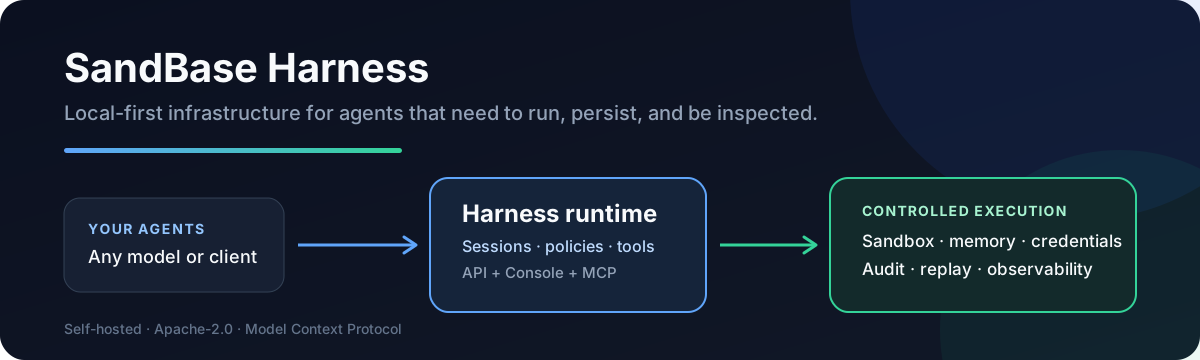
A local-first runtime for AI agents. Sessions, sandboxed tools, memory, credentials, audit trails, and a built-in Console — all running on your machine or in your own infrastructure.
Building with DeepSeek Harness? The independent DeepSeek Harness Handbook provides source-backed runtime guides, multilingual troubleshooting, and a regularly updated Agent-first resource map.
Looking for a lightweight bridge instead of a full runtime? SandBase CLI connects 25 AI client targets to 2,000+ models and APIs through a local stdio MCP bridge. If it fits your workflow, star SandBase CLI so other agent users can discover it.
Need hosted model and media APIs instead? SandBase provides one interface for LLM, image, and video generation APIs, with the API quickstart covering keys and first calls.
bashgit clone --branch v0.3.8 --depth 1 https://github.com/sandbaseai/sandbase-harness.git
cd sandbase-harness
npm ci
npm run build
mkdir ../my-agents && cd ../my-agents
node ../sandbase-harness/dist/index.js init
node ../sandbase-harness/dist/index.js start
# open http://127.0.0.1:3000/dashboard
Choose SandBase Harness when you need more than a model loop:
| Need | What Harness provides |
|---|---|
| Run generated code safely | Local, Docker, Kubernetes, and self-hosted worker sandboxes |
| Inspect long-running agents | Persistent sessions, resumable event streams, audit, and replay |
| Control tool access | MCP toolsets, credential vaults, permission policies, and approvals |
| Operate any model | OpenAI, Anthropic, MiniMax, and OpenAI-compatible providers, including DeepSeek V4 |
| Keep infrastructure yours | Local-first SQLite and file storage with no required hosted control plane |
If this runtime solves a real agent-infrastructure problem for you, star the repository so other builders can find it.
Find SandBase Harness
The project is also discoverable through these independent ecosystem directories:
- Official MCP Registry
- deepseek-plugin.org
- DeepseekPlugin
- DSH Plugin Directory
- DSH Plugin Hub
- DSH Directory
- DSH Harness
- DSH Plugin
- DSH Plugin
- dsh.so Trust & Discovery Registry
- DeepSeek Harness Hub — community discovery page; its metadata is currently stale at v0.3.4, so use the current official installation guide
- Duink DSH Universe
- DSH Plugin Leaderboard
- Awesome repository index
- Awesome DSH Plugin
- Awesome DeepSeek Harness
- Awesome DeepSeek Harness — ecosystem list
- DSHarness 101 Plugin Radar
- DeepSeekDocs Ecosystem
- Awesome Agents
- Sifted Awesome AI Agents — Agent Runtime Top 100
- Arnon-hs Open Source — MCP projects
- SandBase Awesome Agent Runtime
- abordage/awesome-mcp
- cccakeee/awesome-dsh-plugins
- anbeime/skill — Skills index
- Awesome DeepSeek Harness Plugins
- Hermes Ecosystem — SandBase stack
- AgentStack
- HVTracker: independent automated Agent Frameworks profile and ranking snapshot; not a maintainer review or security certification.
- MCP Servers Live
- DSH X-Ray
- DSH Plugins
- Awesome DSH Hub
- Awesome DSH Plugins 2026
- MCP Repository
- MCP Server Hub: public MCP Server Hub listing for SandBase Harness.
- MCPFly submission: repository submission accepted and pending approval; no public listing is claimed yet
- MCP Central API: public downstream registry mirror returning the active
io.github.sandbaseai/sandbase-harnessentry; its version snapshot may lag the current release. - MCPVault
- F8W 中文项目档案
- RepoRank Русский профиль
- Agent Plugins Hub — legacy snapshot
- MCP Market
- OpenAgentSkill — code-review
- PluginBench
- DSH Plugin Store
- DSH Hub
- DSH Packs
- dshbase
- FindHarness
- DSH Market
- DSH Plugins
- DSH Plugin Directory
- DSH Plugin Registry
- dsh-market
- dshplugin.dev
Recently verified community references:
- dshbase verified plugin page
- MCP Repository — verified project page
- DSHarness 101 — verified plugin radar entry
- DSH Plugin Leaderboard — install-verified entry
- awesome-agent-runtime — merged entry
- Awesome Agent Cortex — merged entry
- Awesome AI Devtools — merged entry
- Awesome Agent Skills — merged entry
- Awesome AI Agents — merged Harness entry (supersedes intake issue #56)
- WalkingLabs Awesome Harness Engineering — merged entry
- Adventure Wave Awesome Agent Security — merged entry
- Awesome Native Agent Platforms — merged Harness entry
- awesome-mcp-servers — merged MCP entry
- Awesome MCP — merged Harness entry
- Awesome Agent Plugins — merged Harness plugin entry
- Awesome Coding Agents — merged Harness entry
- Sifted Awesome AI Agents — verified Agent Runtime entry
- Agent Framework Radar — verified automatic entry
- LLM Agents Radar — verified automatic entry
- Awesome DSH Plugin — verified entry
- Awesome DeepSeek Harness — verified entry
- Dominic789654 Awesome DeepSeek Harness — verified public entry
- Zhiyuan-Fan Awesome DeepSeek Harness Plugins — verified runtime entry
- Herdeny Awesome DSH Plugins 2026 — verified public entry
- HackSing DSH Plugins — verified public entry
- white0dew Awesome DSH Plugins — verified generated entry
- saltbo Awesome Stars — verified public entry
- GitHub Insight Radar — verified public recommendation
- Blue-Whale-Harness — verified public directory entry
- DSH Plugin Radar — verified automatic entry
- Awesome DSH Plugin — merged Harness entry
- Awesome DeepSeek Harness — merged runtime entry
- Arnon-hs Open Source / AtlasRepo — verified MCP entry
- Sagargupta16 Awesome MCP Servers — merged entry
- Awesome Agents — merged Harness entry
- Awesome AI Engineering — merged Harness entry
- abordage/awesome-mcp — merged Harness entry
- Awesome DSH Plugin — merged Harness entry
- Awesome DeepSeek Harness — merged Harness entry
- DeepSeek Harness Handbook — merged v0.3.8 bridge guide
- Awesome DeepSeek Harness Top 500 — merged runtime entry
Pending community review:
- GitHub Awesome Copilot issue #2725 — external plugin intake was closed with a “purely paid service” rejection; a maintainer clarification documents the Apache-2.0/self-hosted/Docker boundary, but the current account cannot reopen the issue or trigger
/rerun-intake(handoff) - NeuraLiying Awesome Agent Harnesses Issue #4 — proposed for Production Harnesses, SDKs & Frameworks; maintainer verification covers v0.3.8, installation/MCP sources, selectable backends, and the deployment-dependent isolation boundary (verification)
- Acuvity MCP Servers Registry Issue #18 — proposed the v0.3.8 GHCR stdio bridge with six tools and runtime environment variables; maintainer verification and backend-dependent isolation qualification supplied (verification)
- Nexu Harness Engineering Guide Issue #70 — proposed as a source-backed runtime resource covering sessions, tool governance, approvals, credentials, memory, artifacts, audit/replay, and selectable backends (verification)
- EvoMap Awesome Agent Evolution Issue #53 — submitted under Agent Development Platforms with v0.3.8 release, installation, MCP, stateful-runtime, and backend-dependent isolation evidence (verification)
- Awesome DeepSeek Harness Top 500 Issue #3 — maintainer confirmed the DSH runtime/integration entry was merged after review of the current release, Registry, installation, and backend-boundary evidence (verification)
- Libukai Awesome DeepSeek Harness Issue #94 — proposed as a distinct DSH runtime entry from SandBase CLI, with v0.3.8 installation/MCP and backend evidence (verification)
- E2B Awesome AI SDKs PR #344 — existing canonical Harness entry, currently mergeable; CLA verification still requires contributor action
- Awesome MCP Servers PR #13240 — canonical MCP directory entry with passed
check-submission; maintainer/Glama review remains pending; superseded duplicates #13188 and #13201 are closed - Awesome Harness Engineering PR #226 — proposed a source-backed SandBase Harness reference under Security, Sandbox & Permissions; PR is open and mergeable, with maintainer review pending (verification)
- mcp-catalog PR #2 — weekly ingest lists SandBase Harness as an MCP/skills discovery candidate; final inclusion and categorization remain maintainer-controlled (verification)
- MCP-SecurityTools issue #5 and Awesome Agent Harness issue #30 — source-backed review suggestions with maintainer decisions pending (verification #5, verification #30)
- Awesome Agent Sandbox issue #3 — proposed a container-backed SandBase Harness runtime entry; maintainer review pending (verification)
- awesome-agent-runtimes PR #2 — proposed a source-backed entry in a dedicated Agent Runtime comparison; maintainer review pending (verification)
- awesome-ai-agents-2026 PR #542 — proposed SandBase Harness under Self-Hosted Agents and UIs using the directory's requested table format; maintainer review pending (verification)
- Awesome DeepSeek Agent PR #412 — added bilingual DeepSeek Harness installation/configuration/first-run guides for SandBase Harness; maintainer review pending (verification)
- Sunrisepeak dsh-index PR #43 — updates the SandBase Harness descriptor from v0.3.7 to v0.3.8; build and boot checks passed at the submitted revision, but the PR currently needs a rebase. A local rebase was reproduced successfully; the upstream branch requires maintainer write access to update
- Awesome AI Agents 2026 PR #240 — added the distinct SandBase Harness runtime beside the existing CLI entry under Agent Tooling and Infrastructure; maintainer review pending. The failed link check reports only a pre-existing
ofekron/better-agent404 outside this PR. - E2B Awesome AI Agents Issue #1468 — requested review of SandBase Harness as a distinct runtime entry from the closed CLI submission; follow-up evidence posted, scope decision pending
- E2B Awesome AI Agents PR #1473 — direct open-source agents-list submission created from the issue; the factual entry is mergeable, but the required CLA check remains pending contributor signature
- LuciferForge MCP Directory Issue #52 — Harness MCP listing request; corrected the stale MCP-documentation link with the current installation, runtime, and MCP source paths; directory review remains pending
- MiniMax Awesome Integrations Issue #12 — refreshed the SandBase Harness integration request from v0.3.7 to v0.3.8 and linked the current MiniMax, installation, and MCP guides; maintainer review remains pending
- DhanushNehru Awesome MCP Servers PR #75 — corrected the verification note to use the current
llms-install.mdanddocs/installation.mdpaths after the old MCP-documentation path was removed; maintainer review remains pending - Picrew Awesome Agent Harness PR #86 — corrected an older verification note to use the current MCP installation path; the PR remains the canonical open entry after duplicate #85 was closed
- Nandanhegde MCP Directory Issue #2 — clarified the removed MCP-documentation path and supplied the current installation/runtime links; directory review remains pending
- Collective AI Tools Issue #332 — clarified the removed MCP-documentation path and supplied the current installation/runtime links; directory review remains pending
- MyMCPTools Issue #8 — clarified the removed MCP-documentation path and supplied the current installation/runtime links; directory review remains pending
- Kubernetes Agent Sandbox Issue #1500 — opened a scope discussion about a source-linked SandBase Harness compatibility/deployment example; no existing adapter or inclusion is claimed
- NipunaRanasinghe Awesome AI Agents PR #184 — added SandBase Harness to Core Frameworks using the directory's dynamic stars badge; maintainer review pending
- Zients Awesome Agent Harness PR #10 — added SandBase Harness to Agent Systems & Harnesses; maintainer review pending
- McpMux Server Registry PR #286
- Mctrinh Awesome MCP Servers PR #105
- Docker MCP Registry PR #4841 — validation complete; maintainer review pending
- HabitoAI Awesome MCP Servers PR #37 — added to Developer Tools; PR is clean and maintainer review pending
- MCP Hub / mcpdir issue #20 — separate Harness listing request from the existing CLI entry; directory review pending
- MCP Server Finder evaluation issue #4 — independent MCP bridge evaluation requested; no score or certification claimed
- TensorBlock Awesome MCP Servers issue #2067 — issue and automated PR #2068 were closed as superseded by merged PR #2060; use the merged entry/profile rather than the incomplete generated metadata (historical correction)
- Awesome Agent-Native Services PR #116 — curator-approved dossier with v0.3.8 runtime, MCP, session, approval, credential, and audit/replay evidence; merged by the directory maintainer (verification)
- ToolSDK MCP Registry PR #488 — schema and Biome checks pass; maintainer review pending
- MCP.Directory submission — already submitted; directory review pending
- Hugging Face agent-harness registry PR #2432 — merged at
56e5168; the registry now includes SandBase Harness, whose child shell execution defaults toAI_AGENT=sandbase-harnesswhile preserving explicit nested-agent markers (maintainer confirmation) - Agent Switchboard listing PR #44 — refreshed v0.3.8 listing; maintainer verification pending
- Awesome AI Agents 2026 PR #16 — added SandBase Harness to Agent Runtimes and Platforms; maintainer review pending
- Awesome AI Agent Engineering PR #1 — added SandBase Harness to Deployment; maintainer review pending
- AI Native Landscape submission #18 — submitted under
platform-infra/sandboxes-runtimes; curator review pending - Agentic Community Landscape PR #2 — added SandBase Harness under Agentic → Runtime; maintainer review pending
- MyMCPTools directory issue #8 — proposed the v0.3.8 MCP bridge for directory review; maintainer review pending
- mcp.so/mcpso submission thread — submitted the v0.3.8 MCP bridge through the public GitHub Issue workflow; directory review pending
- Collective AI Tools Issue #332 — submitted SandBase Harness separately from the existing CLI entry; directory review pending
- Awesome Agent Skills PR #79 — added SandBase Harness to MCP runtime and infrastructure; maintainer review pending
- Awesome MCP List PR #409 — added SandBase Harness to AI Agents & Frameworks; maintainer review pending
- Best-of MCP Servers issue #370 — proposed for the ranked MCP server list; v0.3.8 bridge and current installation metadata were supplied in a maintainer update, with inclusion/ranking still pending
- Awesome Agent Runtimes PR #4 — proposed SandBase Harness for the maturity-gated watchlist; current v0.3.8 release, installation, MCP, and API evidence supplied in the maintainer verification; review pending
- DeepYard submission — submitted to the
Frameworks & SDKscategory through the public review form; review pending and no public listing claimed - BotMarket MCP record — public API reports an active record (
102971) sourced from the official MCP Registry; manual submission queue4remains separately tracked - Awesome Agent Sandbox PR #2 — added SandBase Harness to Related Projects; approved with Sourcery and GitGuardian checks passed, while target-maintainer merge remains pending (handoff)
- Awesome Agent Infra PR #6 — added SandBase Harness to Runtime and Control Plane; maintainer review pending
- Awesome CLI Coding Agents PR #314 — added SandBase Harness to Runtime & execution backends; maintainer review pending
- Awesome AI Developer Stack PR #2 — added SandBase Harness to the MCP Servers table; maintainer review pending
- Awesome Agent Cortex PR #74 — added SandBase Harness to Agent Runtime Infrastructure; maintainer review pending
- Awesome Agent Harness PR #29 — added SandBase Harness to the Agent Harness timeline; PR is clean and mergeable, maintainer review pending (verification)
- AutoJunjie Awesome Agent Harness issue #59 — proposed SandBase Harness for Agent Runtimes; current release, API, DeepSeek example, MCP image, and backend-dependent isolation notes supplied for curator review (verification)
- AgentSpot submission #1 — submitted the GitHub-source/release and GHCR MCP distribution; v0.3.8 installation, MCP, and DeepSeek evidence supplied, awaiting free directory review (verification)
- Awesome Loop Engineering resource suggestion #23 — proposed SandBase Harness as a source-backed learning reference for sessions, tool governance, approvals, and audit/replay; maintainer curation pending (verification)
- Best of Agent Harnesses PR #99 — submitted the v0.3.8 Harness entry to the generated ranked catalog; the PR now follows the destination's generator-source contract and passes 54 tests locally. GitHub's fork workflow is awaiting maintainer approval before CI can run; review pending (CI status)
- Awesome Agent Harnesses PR #5 — added SandBase Harness to the coding-agent harness map; PR is clean and mergeable, CodeRabbit status is successful, and maintainer review is pending (verification)
- Awesome Agentic AI 中文 Stage 7 PR #228 — merged at
1cb0406as the conflict-free integration for #213; trilingual entries and 1,036 script/31 targeted checks passed - Awesome Terminal Agents PR #5 — added SandBase Harness as an Engineering-Practice-Tool reference; maintainer review pending
- Awesome MCP DevTools PR #13 — added SandBase Harness to Proxies and Gateways; current v0.3.8 and installation/MCP evidence supplied in the verification comment; maintainer review pending
- Awesome MCP Collection PR #39 — added SandBase Harness to Development & Version Control; maintainer review pending
- Awesome MCP Issue #99 — requested addition to Aggregators & Gateways; maintainer review pending
- Awesome MCP Gateways PR #77 — added SandBase Harness to Open-source MCP Gateways; maintainer review and CLA check pending
- Awesome AI Harness PR #4 — added SandBase Harness to SDKs & runtimes; maintainer review pending
- Awesome AI Coding Sandboxes PR #15 — added SandBase Harness to Adjacent runtimes; maintainer review pending
- Awesome Agent Infrastructure PR #23 — added SandBase Harness to Execution Sandboxes; maintainer review pending
- Awesome Agent Sandboxing PR #2 — added SandBase Harness to Self-hosted Agent Runtimes; maintainer review pending (older duplicate #1 closed)
- Awesome Sandbox PR #27 — added a dedicated SandBase Harness runtime/sandbox guide section; maintainer review pending
- Awesome AI Agents Security PR #107 — added SandBase Harness to Sandboxing & Isolation Environments; verification follow-up posted, PR is mergeable and maintainer review pending
- UCSB Awesome Agent Security PR #16 — added SandBase Harness to System-level Runtime Defense; PR is mergeable and maintainer review pending
- Awesome DevOps MCP Servers PR #327 — added SandBase Harness to Code Execution; verification follow-up posted, PR is mergeable and maintainer review pending
- EverWorks Awesome MCP Servers PR #161 — added SandBase Harness to Code Execution & Automation; current installation/MCP paths and stale-link correction are in the verification comment; maintainer review pending
- AIAnytime Awesome MCP Server PR #78 — added SandBase Harness separately from SandBase CLI; the stale documentation path correction is in the maintainer comment; review pending
- Collabnix Awesome MCP Lists PR #105 — added SandBase Harness to DevOps & Infrastructure; current installation/MCP paths and stale-link correction are in the verification comment; maintainer review pending
- MCP Finder Awesome MCP Servers PR #9 — added SandBase Harness to Cloud and DevOps; current source and backend verification is in the maintainer comment; review pending
- Awesome AI Agent Tools PR #27 — merged a separate SandBase Harness MCP catalog entry with Docker stdio installation metadata
- Enterprise AI Atlas Awesome MCP Servers PR #10 — added SandBase Harness to Developer Tools with Docker stdio installation metadata; PR is mergeable and maintainer review pending
- Awesome-MCP PR #36 — added a structured SandBase Harness
serverentry with stdio transport; PR is mergeable and CI passed - Awesome-MCP PR #36 verification — current v0.3.8, Registry, running-API, and backend boundary confirmed
- bgizdov Awesome MCP Servers PR #17 — added a JSON contribution under DevOps with the published Docker stdio bridge; PR is mergeable and maintainer review pending
- Awesome AI Coding Tools PR #665 — added SandBase Harness to MCP Servers and Directories; verification follow-up posted, PR is mergeable and maintainer review pending
- Awesome AI Developer Tools PR #11 — added SandBase Harness to DevOps & Deployment; PR is mergeable and maintainer review pending
- Pipedream Awesome MCP Servers PR #111 — added SandBase Harness to the Artificial Intelligence MCP server list; verification follow-up is posted, PR is mergeable, maintainer review pending
- Awesome AI & Developer Tools PR #5 — added SandBase Harness to CI/CD & DevOps; PR is mergeable and maintainer review pending
- Awesome AI & Developer Tools PR #5 verification — current release, bridge image, scope, and backend boundary confirmed
- LaunchApp Awesome AI Coding Tools PR #34 — added SandBase Harness to the MCP section with self-hosted and free/open-source tags; PR is mergeable and maintainer review pending
- LaunchApp Awesome AI Coding Tools PR #34 verification — current v0.3.8, Registry/image references, and backend-dependent sandbox boundary confirmed
- AI Agent Sandboxes PR #3 — added evidence-linked structured SandBase Harness metadata; maintainer review pending
- Awesome Agent Sandbox PR #2 — added SandBase Harness to the Self-hosted / Open Source sandbox table; maintainer review pending
- Awesome Agent Sandboxes PR #9 — added SandBase Harness to Containers; maintainer review pending
- Awesome Agent Sandboxes PR #9 verification — current v0.3.8 sources and backend-dependent isolation confirmed
- Awesome Agent Sandbox PR #4 — added SandBase Harness to Container Sandboxes and the comparison table; maintainer review pending
- Awesome Agent Sandboxes PR #59 — added structured SandBase Harness sandbox metadata and regenerated catalog outputs; maintainer review pending
- MeshKore directory submission — accepted for review as submission #15; public profile pending
- Awesome Agentic Open-Source Tools PR #1 — added to Agent Frameworks & Orchestration; maintainer review pending
- awesome-ai-agents-2026 PR #2 — added to Local Runtimes & LLM Management; maintainer review pending
- AgentFirst directory PR #46 — added to Compute & Sandboxes; the repository metadata/media generators were re-run successfully with no additional diff, and the existing
cf412e0metadata commit is verified; maintainer review pending (verification) - AI Agent Tools submission — accepted as open-source infrastructure submission
mtgu4e78fw1ja; directory review pending - AgentVerse-5K PR #3 — added SandBase Harness to Coding Agents and MCP Servers; PR is clean and mergeable, maintainer review pending
- AI Agent Marketplace PR #36 — added SandBase Harness to the marketplace
AGENT.mdusing official installation, MCP, deployment, and issue links; maintainer review pending - Awesome AI Agents PR #4 — added SandBase Harness to Agent Tools with a canonical repository link and factual runtime description; maintainer review pending
- 中文 Awesome AI Agents PR #13 — added SandBase Harness to MCP 生态 with generated catalog data and passing validation; maintainer review pending
- BestAIAgent.in PR #1 — added SandBase Harness to the imported/noindex agent catalog tier with an official source link; maintainer review pending
- 中文 Agent 清单 PR #2 — added SandBase Harness to the runtime/framework section as an independent project from DeepSeek Harness; maintainer review pending
- Protodex MCP Directory issue #52 — submitted SandBase Harness through the directory's public server-request workflow; maintainer/index review pending
- Nandanhegde MCP Directory issue #2 — submitted SandBase Harness through the directory's public server submission workflow; weekly review/indexing pending
- Public MCP Servers PR #12 — added the v0.3.8 Docker stdio bridge with API prerequisite and secret-scope notes; directory validation passed, maintainer review pending
- OpenModels MCP Registry PR #22 — added a structured six-tool stdio entry with the pinned v0.3.8 Docker image, required runtime URL, and optional API-key metadata; validation passed, maintainer review pending
- we-can-use MCP curation PR #2 — added SandBase Harness to the curated English and Korean MCP infrastructure lists with an official source link and backend/deployment isolation qualification; maintainer review pending
- Awesome-AI-Repos PR #2 — added SandBase Harness to the AI Agents & Agent Frameworks section with a concise, canonical repository description; maintainer review pending
- AgentStack directory issue #1 — suggested SandBase Harness for the MCP server category with the official repository, v0.3.8 Docker command, and deployment-dependent isolation note; maintainer review pending
- Awesome Agent Plugins issue #5 — maintainer accepted the existing
agent-plugin/bundle under Dev & Coding after validating both canonical 1.0.0 manifests; the issue is closed and the public catalog entry is live - Official Discussion #116 Agent Plugin update — published a bilingual integration note linking the schema-validated
agent-plugin/bundle and its community review issue - Official Discussion #116 promotion checkpoint — summarized four current community directory review paths and reiterated that they remain pending, with deployment-dependent isolation disclosed
- AI Systems Atlas suggestion #34 — proposed SandBase Harness for evidence-backed review as an operational AI system; Atlas curation review pending
- Awesome Agent OS PR #3 — canonical SandBase Harness runtime submission remains open and mergeable; older duplicate PR #2 was closed
- Awesome Engineering AI PR #3 — proposed SandBase Harness for Harnesses, GUIs and workspaces; GitGuardian and maintainer review pending
- Awesome MCP Toolkit PR #3 — proposed SandBase Harness for the Chinese Developer & Code MCP section; maintainer review pending
- Awesome Agentic AI PR #2 — proposed SandBase Harness for Sandboxes and Computer Use with a source-linked runtime description; maintainer review pending
- MCP Server Finder evaluation issue #4 — requested an independent quality and security assessment of the MCP bridge; review pending
- Agentic DevOps MCP PR #42 — added to Kubernetes & Containers; maintainer review pending
- Awesome DevOps AI PR #54 — merged into MCP Servers for DevOps; the public entry now provides another source-linked discovery path
- Awesome Platform Engineering PR #63 — added to Internal Developer Platforms; maintainer review pending
- Awesome DevOps Platform PR #4 — added to AI & Automation in DevOps; maintainer review pending
- Awesome Platform Engineering PR #11 — added to AI Platform Engineering & LLMOps; maintainer review pending
- Awesome LLMOps PR #539 — generated from project request #538 under Runtime / AI Agent; build passed, maintainer review pending
- TensorChord Awesome LLMOps PR #785 — added SandBase Harness to the LLMOps catalog; DCO now passes and maintainer review is pending
- Awesome-LLMSecOps PR #66 — added a source-linked SandBase Harness entry under Agentic security; PR is clean and mergeable, maintainer review pending
- Awesome Agent Runtime Security PR #30 — added SandBase Harness to Sandboxing & Isolation with explicit deployment/backend limits; PR is clean and mergeable, maintainer review pending
- Awesome LLM Security PR #313 — added SandBase Harness to Tools as a runtime-governance reference; PR is clean and mergeable, maintainer review pending
- Awesome AI Agents PR #467 — existing single-line SandBase Harness entry in the AI-agent resources list; PR is clean and mergeable, maintainer review pending
- Jenqyang Awesome AI Agents PR #460 — added SandBase Harness to Applications → Tools under the repository's OSS and neutral-description rules; PR is clean and mergeable, maintainer review pending
- Slava Awesome AI Agents PR #403 — existing SandBase Harness entry in the AI Agents list; PR is clean and mergeable, maintainer review pending
- Scottcjn Awesome Agents PR #59 — existing SandBase Harness entry in an Agent platforms/frameworks directory; PR is clean and mergeable, maintainer review pending
- Awesome Agent Infrastructure PR #21 — added to Execution Sandboxes; entry refreshed to the current MCP installation guide, maintainer review pending
- Awesome DevOps PR #30 — added SandBase Harness to the MCP tools catalog; DCO passed, maintainer review pending
- Awesome Self-Hosted Agents PR #6 — added SandBase Harness to the self-hosted agent frameworks list; PR is clean and maintainer review pending
- Awesome Agent Infra PR #2 — added SandBase Harness to the machine-readable runtime catalog; validation, tests, and lint pass, maintainer review pending
- Awesome AI Agents PR #1 — added SandBase Harness to Agent infrastructure; PR is clean and maintainer review pending
- Awesome Agent Operating Systems PR #13 — merged SandBase Harness into Agent Runtimes with a dated verification link
- Awesome Agent Services PR #8 — added SandBase Harness to Sandboxes & Compute; PR is clean and maintainer review pending
- Awesome AI Automation PR #3 — added SandBase Harness to AI agents & LLM automation; PR is clean and maintainer review pending
- Awesome Best Open Source AI Agents 2026 PR #1 — added a GitHub-verified runtime entry with license, language, Stars, activity, and Best-for metadata; PR is clean and maintainer review pending
- Awesome AI Agents — Agent Playbook PR #1 — added SandBase Harness to the self-hosted frameworks list; PR is clean and maintainer review pending
- Discussion #116 — official DevOps runtime and MCP bridge discovery post; latest promotion checkpoint records the Awesome MCP merge and current community review paths (checkpoint)
- DeepSeek Harness Showcase update — bilingual update covering the gVisor integration path and corrected Hugging Face attribution review
- Cline MCP Marketplace issue #2364 — v0.3.8 MCP bridge submission under review; see the maintainer verification note and official bilingual update
- MCPSo submission issue #3834
- Awesome Agent Frameworks architecture proposal #6
- Agent Sandbox Taxonomy profile proposal #5
- Open-Kairox Awesome Agent Harnesses Issue #1 — suggested for the bilingual Agent Harness list; maintainer verification covers v0.3.8, installation/MCP, runtime controls, and backend-dependent isolation (verification)
- AgentSeal MCP Security Registry issue #36 — requested the registry's normal MCP security analysis for the v0.3.8 bridge; current source, release, installation, six-tool, and backend-dependent isolation evidence are provided without requesting a preset score or certification (verification)
- Awesome Claude Code issue #2657 — maintained a separate SandBase CLI suggestion with current v0.1.17, Apache-2.0, MCP Registry, and 25-client documentation evidence; no ranking, endorsement, or security certification is claimed (verification)
- MCPDir issue #20 — maintained the separate SandBase Harness runtime submission with v0.3.8, six-tool MCP bridge, installation, and backend-dependent isolation evidence (verification)
- MCPRadar scan request #8 — requested an independent scan of the official v0.3.8 MCP bridge; current image, Registry identity, launch configuration, user-owned API boundary, and backend-dependent isolation were verified (verification)
- Awesome MCP Registry nomination #49 — submitted the current MCP bridge for the directory's normal automated evaluation, with release, Registry identity, image, installation, API, and backend-boundary evidence (verification)
- AgentStack issue #1 — proposed SandBase Harness for the MCP server directory with current release, Registry, image, installation, user-owned API, and backend-boundary evidence (verification)
- AI Systems Atlas issue #34 — proposed SandBase Harness as an operational AI system with current license, runtime, installation, MCP, and deployment-boundary evidence (verification)
- RUCAIBox Awesome Agent Harness issue #11 — submitted a scope-qualified runtime resource proposal with current release, source, installation, MCP, and handbook evidence; formal-paper-only scope remains a valid reason to close it (verification)
- Awesome Agent Harness survey issue #14 — supplied conservative Full-Stack matrix evidence, retaining partial labels for context management and evaluation (verification)
- AAE Agent Engineering issue #1 — proposed SandBase Harness for the Agent Harness category with source, release, architecture, MCP metadata, and DeepSeek integration evidence (verification)
- Bilingual Awesome Agent Harness issue #7 — verified the English/中文 runtime proposal with current release, API, MCP, DeepSeek, and bridge-image evidence (verification)
- Kubernetes SIG Agent Sandbox issue #1500 — opened a scope-qualified compatibility/example discussion separating Kubernetes workload orchestration from Harness session governance (verification)
- Awesome DSH Plugins issue #17 — clarified the separate repository, MCP Registry, and OCI identities from the unrelated
managed-agentsnpm package; conservative Hold Queue remains valid if a unique npm name is required (verification) - Awesome MCP issue #99 — maintained a separate Gateway & Proxy category proposal while distinguishing it from the merged Sandbox & Execution entry; current MCP/runtime evidence and the backend-dependent boundary are documented (verification)
- Awesome Agent Sandboxes PR #9
- Mossaka Awesome Agent Sandboxes PR #1
- Yenanjing Awesome Harness Engineering PR #6
- Awesome Harness Engineering 中文版 PR #6
- Awesome Harness Engineering PR #226 — added SandBase Harness to Security, Sandbox & Permissions with a source-backed technical description; maintainer review pending
- Awesome Agent Architecture issue #90 — proposed as a source-backed system under study, with architecture/runtime evidence and maintainer verification (verification)
- AgentIndex issue #3 — proposed a source-backed runtime index entry; maintainer verification covers v0.3.8, installation/MCP, session governance, audit/replay, and backend-dependent isolation (verification)
- Agent Harness MCP preset issue #47 — proposed a source-backed MCP preset using the published bridge image and six tools; maintainer review is pending (verification)
- dsh-index PR #43 — proposed the current SandBase Harness descriptor; checks passed at submission but the PR currently needs a rebase
- Discussion #116 update — v0.3.8 安装与已合并集成状态(中文更新);欢迎用户反馈
- Discussion #116 latest update — announced the merged Awesome Coding Agents listing and reiterated the current installation source plus the TensorBlock metadata caveat
- Discussion #116 promotion update — bilingual checkpoint for the DeepYard review submission and BotMarket manual-review queue
- Discussion #116 BotMarket status correction — records the active Registry-sourced BotMarket MCP entry and separates it from manual queue
4 - Discussion #116 TensorBlock update — announces the merged TensorBlock MCP entry and public profile with the current v0.3.8 bridge reference
- Discussion #116 promotion checkpoint — records four newly reconciled public directory merges and the corresponding Daily Ops PR #458
- Discussion #116 promotion checkpoint — summarizes the latest MCP, AgentStack, AI Systems Atlas, Agent Harness, AAE, and bilingual-list review paths
- Discussion #116 registry status correction — records Awesome MCP Registry nomination workflow success while noting validation was skipped and public listing remains pending
- Discussion #116 public listing confirmation — confirms the maintained Awesome Agent Plugins catalog has accepted
sandbase-harnessunder Dev & Coding - Discussion #116 DSH listing confirmation — records the merged Awesome DeepSeek Harness Top 500 entry and accepted Blue-Whale-Harness sandbox listing
- AAE Agent Engineering issue #1 — proposed for the curated Agent Harness category; curator review pending
- HKUST-KnowComp Awesome Agent Harness issue #8 — proposed as a source-linked runtime resource; current v0.3.8 evidence and backend-dependent isolation scope were supplied for curator review
- Picrew Awesome Agent Harness issue #82 — handbook entry prepared in commit
ddbf183; waiting for the maintainer to apply it because the available fork has unrelated history - Picrew Awesome Agent Harness PR #86 — canonical SandBase Harness catalog submission remains open and mergeable after a current-source verification follow-up; conflicting duplicate PR #85 was closed
- Awesome AI Engineering PR #4 — merged at
0a308b0, adding SandBase Harness to the open-source agent-engineering project table - TensorBlock Awesome MCP Servers PR #2060 — merged at
c88cedf; the current v0.3.8 bridge entry is now available through the TensorBlock profile - MCPVault submission — public submit flow requires GitHub sign-in; normal submission returned
401 not_signed_in, so no listing is claimed - Awesome Agentic MCP Security PR #28 — MCP hosting/runtime entry with v0.3.8 verification; GitHub reports
UNSTABLE - RoyalPinto Awesome MCP Security PR #4 — permission-category entry with v0.3.8 and backend-boundary verification; maintainer review pending
- Awesome AI Developer Tools PR #11 — DevOps & Deployment entry with current Registry/GHCR and v0.3.8 verification; maintainer review pending
- LAS-WG Awesome Agent Infrastructure PR #10 — Open-Source Projects entry with v0.3.8 and backend-boundary verification; maintainer review pending
- Awesome Agent Skills PR #79 — MCP runtime/infrastructure entry with v0.3.8 verification; GitHub reports
UNSTABLE - Awesome MCP List PR #409 — AI Agents & Frameworks entry with v0.3.8 and backend-boundary verification; maintainer review pending
- Awesome Agent Sandboxes PR #59 — generated sandbox catalog entry with refreshed outputs and non-universal isolation scope; maintainer review pending
- Awesome Agent Sandbox PR #2 — self-hosted sandbox entry with v0.3.8 source verification; maintainer review pending
- Awesome Agent Sandbox PR #4 — container sandbox entry with backend-dependent isolation verification; maintainer review pending
- Awesome CLI Coding Agents PR #314 — Runtime & execution backends entry with v0.3.8 source verification; maintainer review pending
- Awesome Terminal Agents PR #5 — Engineering-Practice-Tool runtime reference with v0.3.8 verification; maintainer review pending
- Awesome AI Agents 2026 PR #16 — agent runtimes/platforms entry with v0.3.8 and backend-boundary verification; maintainer review pending
- Awesome Agent Infra PR #6 — Runtime and Control Plane entry with v0.3.8 source verification; GitHub reports
UNSTABLE, maintainer review pending - Curated MCP Servers PR #9 — Developer Tools & Infrastructure entry with v0.3.8 source verification; maintainer review pending
- Awesome Agent Runtimes PR #1 — runtime comparison entry with v0.3.8 and backend-boundary verification; maintainer review pending
- AI Agent Infrastructure List PR #4 — English/Chinese runtime entries with current v0.3.8 evidence; verification posted, maintainer review pending
- Skyming Awesome AI Agent PR #19 — concise Chinese runtime entry with v0.3.8 source verification; maintainer review pending
- Awesome Agent Harness PR #58 — Agent Runtimes entry with maintainer disclosure and verification; maintainer review pending
- Awesome Agent Security PR #10 — Sandboxed Execution entry with explicit non-certification scope; maintainer review pending
- DevInsight Awesome MCP PR #6 — MCP Servers entry with current v0.3.8 and backend-boundary verification; maintainer review pending
These listings are independent directories; the repository and its release metadata remain the source of truth.
Try it in Codespaces

The included development container installs dependencies and builds the runtime. When the terminal is ready, start the server on the forwarded port:
bashnode dist/index.js start --host 0.0.0.0
Open the forwarded SandBase Harness Console port, then configure a model in Settings > Models. Codespaces usage may be billed by GitHub; the local quick start below remains free and keeps all runtime data on your machine.
Why
Agent SDKs handle the model loop. Production agents need more: persistent
sessions, tool governance, sandbox boundaries, credential handling, memory,
auditability, and a UI for humans to inspect what happened. managed-agents
is that runtime layer — not a visual workflow builder and not another model SDK.
Features
- Claude Managed Agents-style
/v1API and local Console - SQLite-backed agents, sessions, environments, credential vaults, memory stores, files, skills, and API keys — SQLite metadata by default
- local file/skill bytes stored in the workspace state directory
- Resumable Server-Sent Events for session replay and debugging
- One active model provider boundary configured through Settings V2
- Sandbox backends: local process, Docker (per-session containers), Kubernetes (kubectl exec/cp), self-hosted worker queue
- Settings V2: one workspace model vendor, loop engine, storage, memory, sandbox — with validation, form/JSON modes, and restart flow
- MCP toolsets, permission policies, built-in tools, and skill packages
- DeepSeek Harness bridge over MCP stdio for agents, sessions, streamed turns, artifacts, and cancellation
- TypeScript SDK at
managed-agents/sdk - Release gate:
npm run release:check
Screenshots
| Console overview | Settings | API reference |
|---|---|---|
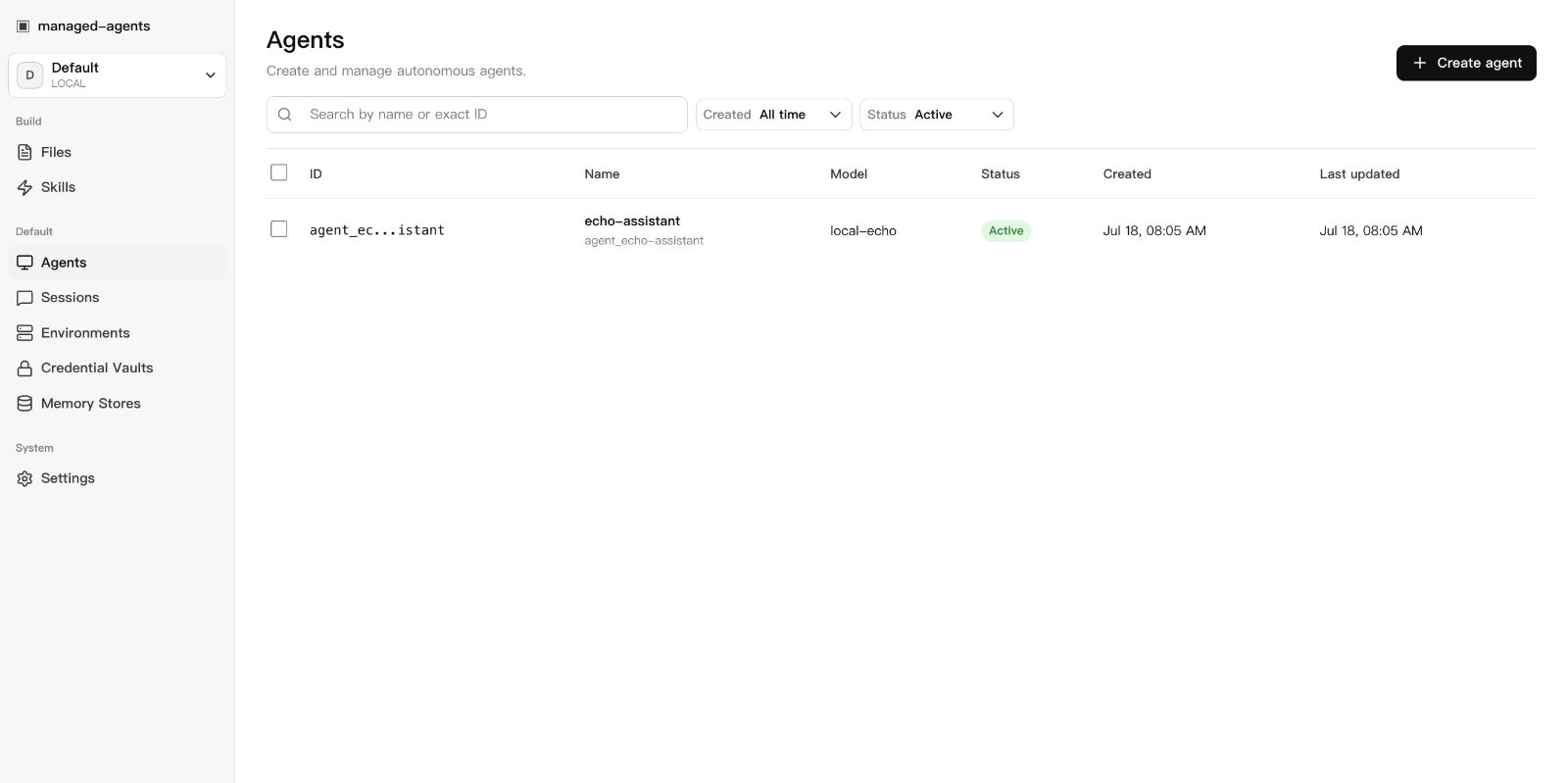 | 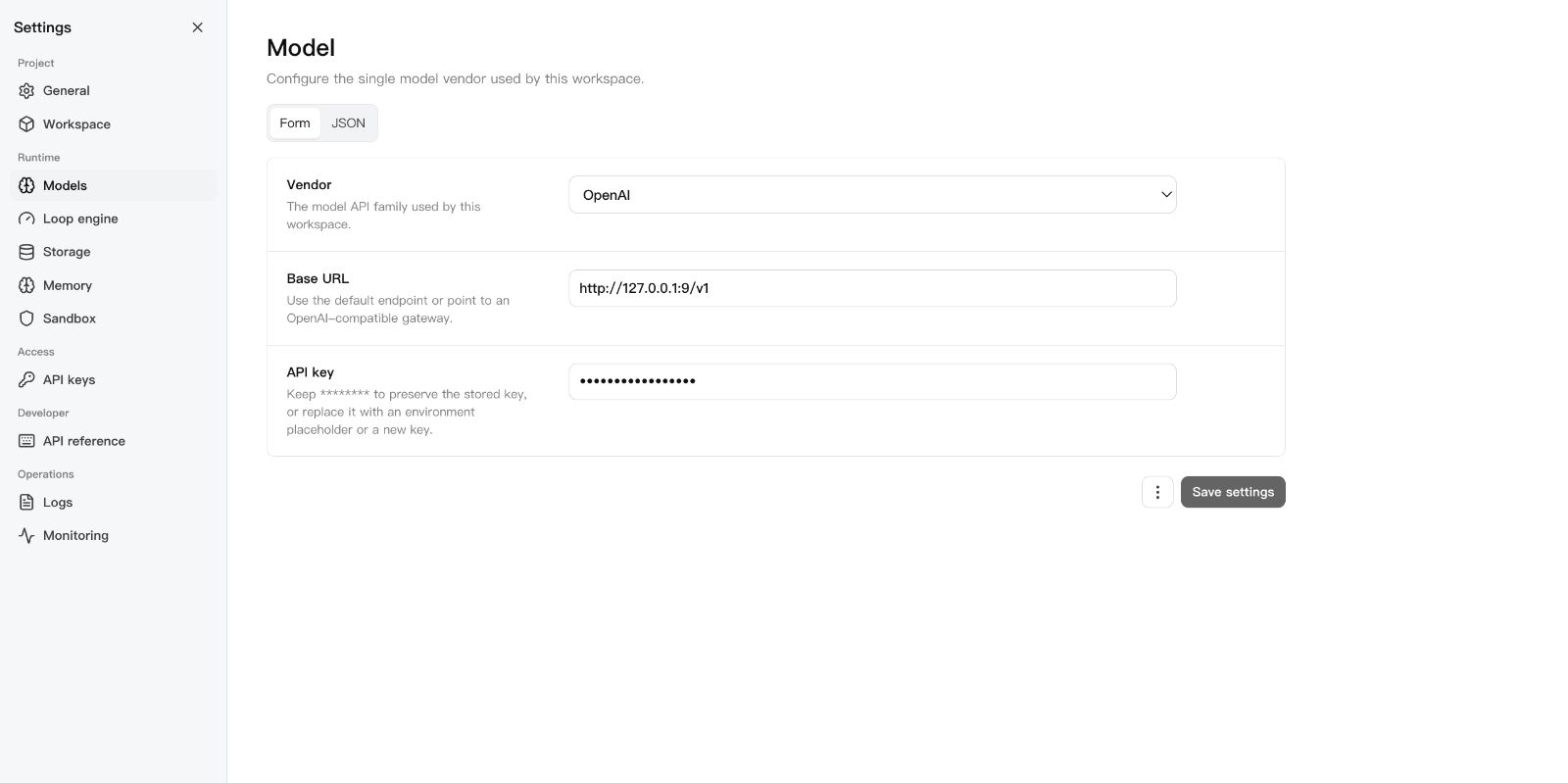 | 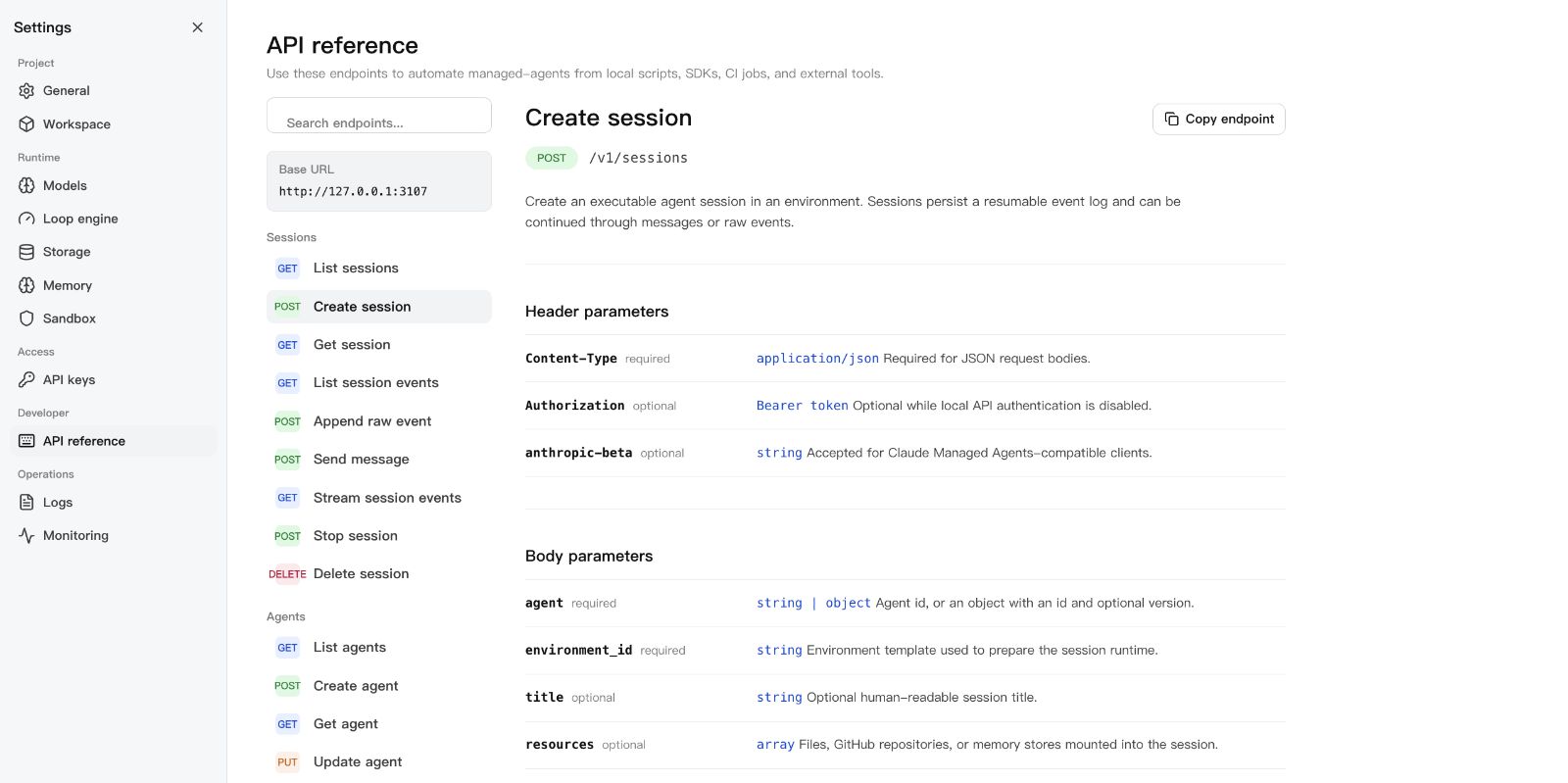 |
Start with a use case
See the Showcase for three practical paths: an auditable coding agent, DeepSeek Harness as an interactive front end, and controlled code execution across Local, Docker, Kubernetes, and self-hosted sandboxes.
For client-specific setup, see the installation guide, including the pinned Cline CLI command and the Docker MCP Bridge configuration.
Community use-case discussions:
- Memory migration between Codex, Claude Code, and DSH
- Sandbox and filesystem protection for third-party plugins
Requirements
- Node.js 22+
- npm 10+
- A model provider API key (OpenAI, Anthropic, MiniMax, or an OpenAI-compatible endpoint)
- Docker (optional, for Docker-backed sandboxes)
DeepSeek Harness
Run this project as a DSH plugin instead of treating dsh-plugin as discovery
metadata only. Install the bundle into a DSH profile, start managed-agents,
then boot that profile:
bashexport MANAGED_AGENTS_URL=http://127.0.0.1:3000
# Preferred: install a local source checkout after `npm run build`.
dsh plugin --profile web add -w ../sandbase-harness
# Git URL fallback. Keep HTTPS; do not convert the spec to SSH.
# dsh plugin --profile web add git+https://github.com/sandbaseai/sandbase-harness.git
dsh web
If Plugin Hub reports already installed: managed-agents after a partial or
repeated install, update the Hub first, then remove only the displayed
managed-agents plugin entry and retry from the tagged HTTPS Git source:
bashdsh plugin --profile web update dsh-plugin
dsh plugin --profile web remove managed-agents
dsh plugin --profile web add git+https://github.com/sandbaseai/sandbase-harness.git
This is a Plugin Hub duplicate-install path, not an npm installation path. If the installed view shows a different target identifier, remove that exact identifier instead. Keep the profile directory and its evidence until the runtime starts successfully; see the reported recovery issue.
The profile installs the verified source checkout directly; it does not resolve
the unrelated unscoped npm package. A git-hosted install runs prepare only
when dist/ is missing. Keep the HTTPS git spec; converting it to SSH fails on
Windows hosts without GitHub SSH access.
A git-hosted install needs one extra step for pnpm's build allowlist. The
first dsh plugin --profile web add fails with
ERR_PNPM_GIT_DEP_PREPARE_NOT_ALLOWED and prints the exact key. Add that key
under allowBuilds: in the profile's pnpm-workspace.yaml, then re-run the
same add command; a plain package name does not match a git-hosted
resolution:
yamlallowBuilds:
  "managed-agents@https://codeload.github.com/sandbaseai/sandbase-harness/tar.gz/<commit>": true
The second run builds dist/ through prepare, creates the
managed-agents / managed-agents-mcp bins, and joins the bundle layer. The
patch starts the bundled MCP entry over
stdio. DSH can then list agents,
create and run sessions, inspect results and artifacts, and stop work through
native mcp__sandbase__* tools. See
examples/deepseek-harness for the full
tool list and authenticated-runtime configuration.
For a walkthrough that starts with DSH and adds this runtime as a real third-party plugin, read the DeepSeek Harness developer guide. The Chinese edition is available as well; both articles are maintained against the pinned SandBase Harness v0.3.8 integration.
Pair the plugin with SandBase Skills to give the same DSH project a portable, source-verifiable research workflow:
bashnpx --yes github:sandbaseai/sandbase-skills add multi-source-search
dsh web
This installs the complete Skill into .dsh/skills/multi-source-search, DSH's
project-scoped discovery directory. It runs from GitHub source and needs no
SandBase account when DSH already provides web/search tools.
For a complete, reproducible workflow that combines the evidence ledger with sandboxed execution, credentials, audit, and replay, read Build an Auditable Research Agent.
New to DSH profiles, plugin composition, tool policy, or session semantics? The independent DeepSeek Harness Handbook provides source-backed quickstarts, architecture maps, and troubleshooting for the runtime layers used by this integration. Read its SandBase Harness bridge guide for the DSH-specific contract, then start with the local-browser Install Doctor for installation evidence, or use the Failure Router to identify the first broken runtime boundary.
Quick Start
bashgit clone --branch v0.3.8 --depth 1 https://github.com/sandbaseai/sandbase-harness.git
cd sandbase-harness
npm ci
npm run build
mkdir ../my-agents && cd ../my-agents
node ../sandbase-harness/dist/index.js init
node ../sandbase-harness/dist/index.js start
Open http://127.0.0.1:3000/dashboard, go to Settings > Models, paste your
API key, and you're running.
The unscoped managed-agents name on npm is not this project. Until an
official scoped package is announced in this repository, install only from the
tagged GitHub source release shown above. Do not run npx managed-agents or
npm install managed-agents.
The six-tool MCP bridge is published as a multi-architecture OCI image. Start the Harness API, then add this stdio command to an MCP client:
Container package: GitHub Container Registry
bashdocker pull ghcr.io/sandbaseai/sandbase-harness-mcp:0.3.8
docker run --rm -i \
  -e MANAGED_AGENTS_URL=http://host.docker.internal:3000 \
  ghcr.io/sandbaseai/sandbase-harness-mcp:0.3.8
For an authenticated remote runtime, also pass MANAGED_AGENTS_API_KEY. The
container image contains only the MCP bridge; agent sessions and sandbox work
remain in the connected Harness runtime. Every release image is built from the
matching Git tag for linux/amd64 and linux/arm64, includes OCI source and
MCP ownership metadata, and receives a GitHub build-provenance attestation.
Portable Agent Plugin
Copilot CLI, VS Code, and other Agent Plugins 1.0 clients can install the same OCI-backed MCP bridge directly from this repository. Start the Harness API and Docker first, then expose its URL to the plugin process:
bashexport MANAGED_AGENTS_URL=http://host.docker.internal:3000
# Optional when the runtime requires authentication:
export MANAGED_AGENTS_API_KEY=your-runtime-key

copilot plugin install sandbaseai/sandbase-harness:agent-plugin
The plugin passes these environment variables through to the pinned
ghcr.io/sandbaseai/sandbase-harness-mcp:0.3.8 image. It does not store a key
in plugin.json, mcp.json, or the installed plugin files. On Linux, the
plugin's Docker command maps host.docker.internal through host-gateway.
For development from the latest main branch:
bashgit clone https://github.com/sandbaseai/sandbase-harness.git
cd sandbase-harness && npm ci && npm run build
cd .. && mkdir my-agents-dev && cd my-agents-dev
node ../sandbase-harness/dist/index.js init
node ../sandbase-harness/dist/index.js start
Workspace Layout
1my-agents/
2├── agents/                  # Seed agent definitions (YAML)
3│   └── assistant.yaml
4├── skills/                  # Seed skill packages
5│   └── example-skill/
6│       └── SKILL.md
7└── .managed-agents/         # Runtime state (gitignored)
8    ├── config.yaml          # Workspace configuration
9    ├── data.db              # SQLite metadata
10    ├── logs/runtime.log
11    ├── files/               # Uploaded file bytes
12    ├── skills/              # Uploaded skill packages
13    ├── snapshots/           # Session workspace snapshots
14    └── sandbox/             # Local session sandboxes
Configuration
.managed-agents/config.yaml:
yamlmodel:
  provider: openai
  api_key: ${OPENAI_API_KEY}

storage:
  metadata: { provider: sqlite, options: {} }
  artifacts: { provider: local, options: { base_path: files } }
Agents pick concrete model IDs (gpt-4o, claude-sonnet-4-20250514,
openai/gpt-5.5). The workspace config only says how to reach the model
service.
For DeepSeek V4 Pro/Flash configuration, including maximum reasoning effort, see DeepSeek V4.
For first-class MiniMax configuration, regional endpoints, and the supported MiniMax-M3 and MiniMax-M2.7 model IDs, see MiniMax.
CLI
bashmanaged-agents init
managed-agents start [--host 127.0.0.1] [--port 3000]
managed-agents list
managed-agents reload
managed-agents chat <agent-id> --message "hello"
managed-agents template list | install <name> | create <name>
API Examples
Create an agent:
bashcurl -X POST http://127.0.0.1:3000/v1/agents \
  -H "Content-Type: application/json" \
  -d '{
    "name": "Incident commander",
    "model": "gpt-4o",
    "system": "You are an on-call incident commander.",
    "tools": [{ "type": "agent_toolset_20260401" }]
  }'
Create an environment (local sandbox):
bashcurl -X POST http://127.0.0.1:3000/v1/environments \
  -H "Content-Type: application/json" \
  -d '{
    "name": "Default local",
    "config": { "hosting_type": "local", "sandbox_provider": "local" }
  }'
Create a Docker-isolated environment:
bashcurl -X POST http://127.0.0.1:3000/v1/environments \
  -H "Content-Type: application/json" \
  -d '{
    "name": "Docker sandbox",
    "config": {
      "sandbox_provider": "docker",
      "image": "node:22-slim",
      "resources": { "memory": "1g", "cpu": 1 }
    }
  }'
Start a session:
bashcurl -X POST http://127.0.0.1:3000/v1/sessions \
  -H "Content-Type: application/json" \
  -d '{
    "agent": "agent_...",
    "environment_id": "env_...",
    "title": "Triage SENTRY-123"
  }'
Send a message:
bashcurl -X POST http://127.0.0.1:3000/v1/sessions/SESSION_ID/messages \
  -H "Content-Type: application/json" \
  -d '{ "content": "Investigate the alert." }'
Resume the event stream:
bashcurl -N http://127.0.0.1:3000/v1/sessions/SESSION_ID/events/stream \
  -H "Last-Event-ID: 42"
SDK
typescript1import { ManagedAgentsClient } from 'managed-agents/sdk';
2
3const client = new ManagedAgentsClient({
4  baseUrl: 'http://127.0.0.1:3000',
5});
6
7const session = await client.sessions.create({
8  agent: 'agent_...',
9  environment_id: 'env_...',
10});
11
12for await (const event of client.sessions.chat(session.id, 'Hello')) {
13  if (event.type === 'agent.message_chunk') {
14    process.stdout.write(event.delta ?? '');
15  }
16}
The /v1 API follows Claude Managed Agents resource shapes, so you can also
point the Anthropic SDK at the local runtime:
typescript1import Anthropic from '@anthropic-ai/sdk';
2
3const client = new Anthropic({
4  apiKey: process.env.MANAGED_AGENTS_API_KEY ?? 'local-dev-key',
5  baseURL: 'http://127.0.0.1:3000',
6});
7
8const session = await client.beta.sessions.create({
9  agent: 'agent_...',
10  environment_id: 'env_...',
11});
Authentication
Open by default. Authentication activates when at least one API key exists:
bash# Static key via environment
export MANAGED_AGENTS_API_KEY=sk-local-example

# Or create a managed key
curl -X POST http://127.0.0.1:3000/v1/api-keys \
  -H "Content-Type: application/json" \
  -d '{ "name": "Local Console" }'
Clients send Authorization: Bearer <key>.
Agent Definition
Agents are YAML files in agents/:
yaml1name: Incident commander
2description: Triages alerts and coordinates response.
3model: gpt-4o
4system: |-
5  You are an on-call incident commander.
6mcp_servers:
7  - name: sentry
8    type: url
9    url: https://mcp.sentry.dev/mcp
10tools:
11  - type: agent_toolset_20260401
12    default_config:
13      permission_policy: { type: always_ask }
14    configs:
15      - name: bash
16        permission_policy: { type: always_ask }
17  - type: mcp_toolset
18    mcp_server_name: sentry
19skills:
20  - type: custom
21    skill_id: skill_...
22metadata:
23  template: incident-commander
Development
bashnpm ci
npm run typecheck    # src + tests
npm test             # vitest
npm run build        # runtime + console + SDK
npm run release:check  # full local release gate
release:check runs typecheck, tests, both builds, npm pack --dry-run, CLI
init smoke, and examples/basic startup smoke.
SandBase Ecosystem
- SandBase Skills — 88 installable Agent Skills for research, social intelligence, marketing, and business workflows across Codex, Claude Code, Cursor, Gemini CLI, and other clients.
- SandBase CLI — connect Cursor, Claude Code, Codex, Windsurf, Gemini CLI, OpenCode, and other MCP clients to 2,000+ AI models and APIs with one onboarding command.
- DSH Plugin Store — discover, filter, install, and manage community DeepSeek Harness plugins from the native Settings experience.
- SandBase — hosted agent infrastructure, model access, tools, and managed sandboxes.
Documentation
- Machine-readable project metadata
- Agent / MCP installation guide
- Agent Plugin marketplace manifest
- Agent Plugins Directory listing — source-indexed plugin page; the directory does not execute plugin code or provide a security endorsement.
- Installation
- Usage Guide
- API Reference
- Skills
- Deployment
- Architecture
- Contributing
- Citation metadata
- Promotion status
- Promotion outreach templates
- Changelog
Community Guides
- Build an Auditable Research Agent — a reproducible guide combining evidence ledgers, sandboxed execution, credentials, audit, and replay with SandBase Harness.
- Self-host the SandBase agent runtime by SSD Nodes — an independent VPS walkthrough covering installation, agent configuration, MCP servers, sandbox modes, and reverse-proxy deployment. The article demonstrates v0.3.2; use the current release command above for v0.3.8.