deepseek-harness-desktopDeepSeek Harness plugin
Native desktop app for DeepSeek Harness — an Electron shell that runs the harness locally and hosts the official Web GUI unchanged.
- Stars
- 143
- Forks
- 7
- License
- MIT
- Last commit
- Sep 1, 2026
- Latest release
- dsh-v0.1.0-rc.15
Overview
Native desktop app for DeepSeek Harness — an Electron shell that runs the harness locally and hosts the official Web GUI unchanged.
Original README
Cached from the project repository on Sep 3, 2026. This is source content, separate from the Agents.md review above.
DeepSeek Harness Desktop
English | 中文

A desktop shell for DeepSeek Harness: it runs the harness as a supervised child process and hosts the existing Web GUI unchanged.



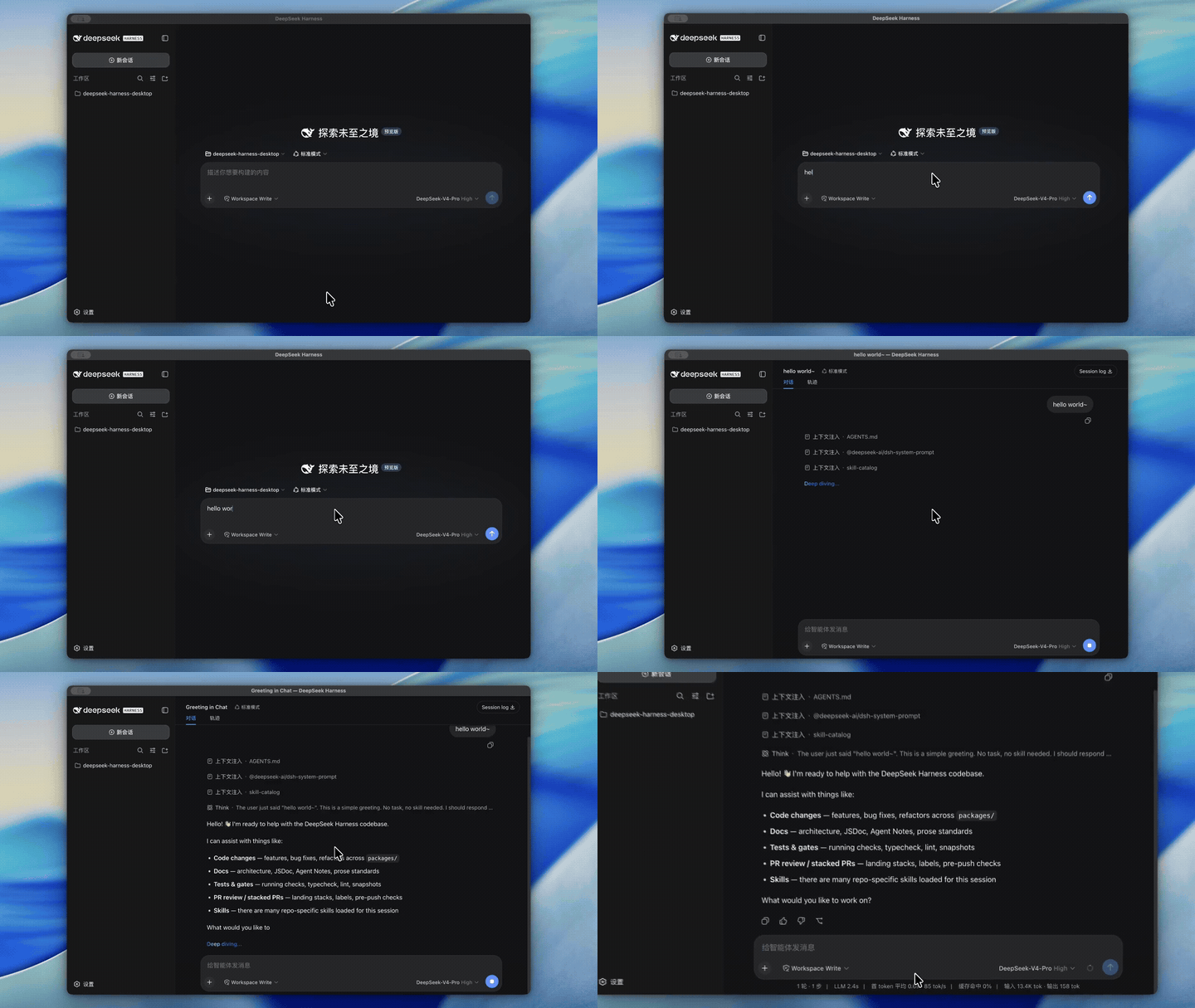
The shell is a thin layer: it spawns dsh web, waits for the readiness line, opens one BrowserWindow at the served loopback origin, and owns shutdown and crash-restart. The renderer is Chromium loading that origin, so window.__DSH_BOOT__ injection and the /api transport behave exactly as under dsh web. No UI is reimplemented.
[!NOTE] DeepSeek Harness is in developer preview with compatibility-breaking changes, and the shell tracks it. macOS installers are signed and notarized; Windows installers are unsigned, so Windows SmartScreen warns on first open.
Download
Installers use fixed filenames, so these one-click links always fetch the latest release:
| Platform | Package | Download |
|---|---|---|
| macOS Apple Silicon | DMG installer (arm64) | DeepSeek.Harness-arm64.dmg |
| Windows x64 | NSIS installer | DeepSeek.Harness-x64.exe |
The Releases page keeps the full version history.
macOS Intel (x64) is deferred until the harness's native dependencies are built for x64; Windows ARM64 is not supported.
Why this project exists
DeepSeek Harness already provides the complete agent runtime and Web GUI. The shell does not reimplement Harness; it supplies the host capabilities a desktop product needs:
- Run without manually starting a CLI or managing local ports.
- Supervise the harness child process — readiness, logs, shutdown, and crash-restart — in one place.
- Bundle a portable Node runtime and the harness closure so a packaged app needs no
PATHdshand upgrades leave user data untouched. - Harden the renderer with Electron's isolation options.
Relationship to DeepSeek Harness
This shell wraps deepseek-ai/deepseek-harness and contributes only the host capabilities listed above. For command-line use of Harness or core feature work, see the official repository.
It is a community project built on DeepSeek Harness, not an official DeepSeek product.
Features
- Opens directly into the harness Web GUI, showing a connecting page until the child reports ready.
- Holds a single-instance lock; a second launch focuses the existing window.
- Restarts the harness on unexpected exit with exponential backoff.
- Stops the child gracefully on exit (SIGTERM, then SIGKILL after a timeout).
- Forwards
dsh://deep links to the renderer. - Listens only on a random
127.0.0.1port (--port 0by default). - Uses the DSH brand icon in the window, the macOS dock, and the packaged
.icns/.ico. - Lives in the system tray; closing the window hides to tray instead of quitting.
- Launch at login from General settings or the tray (packaged builds only; off by default).
- Optional system notifications on unexpected exit, repeated crashes, and recovery (on by default).
- Checks for updates in the background and downloads them; once downloaded, a badge appears beside the Settings trigger and the update installs on the next quit.
Quick start
Prerequisites
- Node
^22.19 || >=24for the harness child. - Development: the repository built (
pnpm run build), orDSH_DESKTOP_DSH_BINpointing at adshlauncher. - Packaging: the repository built, so the deployed CLI carries its
lib/artifacts and the frontend dist.
Local development
shpnpm --filter @deepseek-ai/dsh-desktop dev
dev builds the shell, starts Electron, then watches src/ and restarts the app whenever the emitted lib/ settles, so shell edits reload without a manual re-run. build then start runs the two steps separately. The window shows the connecting page until the harness reports ready, then loads the served origin.
Packaging
shpnpm run build                                  # repo-wide; builds the CLI and frontend
pnpm --filter @deepseek-ai/dsh-desktop dist:mac # macOS .dmg
pnpm --filter @deepseek-ai/dsh-desktop dist:win # Windows x64 NSIS installer
dist builds the shell, stages the self-contained runtime, and packages for the current platform; dist:mac and dist:win fix the target. Because the harness has architecture-specific native modules, build each installer on its own OS: dist:mac on macOS, dist:win on Windows.
Runtime architecture
DSH Desktop (Electron main)
├── HarnessSupervisor — child lifecycle, readiness, logs, crash-restart
├── Single-instance lock and dsh:// deep-link forwarding
└── Hardened BrowserWindow
     └── http://127.0.0.1:<random>  DeepSeek Harness Web UI

Electron resources (packaged)
├── runtime/<platform>-<arch>/  bundled Node v22.19.0
└── harness/                    deployed @deepseek-ai/dsh closure
Self-contained runtime
A packaged app does not rely on a PATH dsh. prepare:runtime stages two bundles under vendor/ and prunes what the packaged app never loads:
vendor/runtime/<platform>-<arch>/— one portable Nodev22.19.0binary for the build host's architecture (macOS arm64 or x64, Windows x64), downloaded from nodejs.org with itsinclude/headers dropped.vendor/harness/— the@deepseek-ai/dshclosure produced bypnpm deploy, withlib/bin.jsas the entry, foreign-platformnode-ptyprebuilds removed, and@mistralai/mistralaisource trees dropped.
electron-builder copies both into resources/ via extraResources. At launch the shell prefers the bundled Node + dsh bin and falls back to DSH_DESKTOP_DSH_BIN, then the repository's built CLI, when the bundle is absent (development).
Release
A tag-triggered workflow (desktop-release.yml) builds and publishes the installers. Pushing a dsh-v* tag — the desktop app shares the dsh family's version and tag — builds a macOS arm64 .dmg and a Windows x64 NSIS installer and attaches both to a GitHub Release titled DeepSeek Harness Desktop <version>. A manual dispatch with publish: false rehearses the build without creating a release.
- macOS: signed with a Developer ID Application identity and notarized.
- Windows: unsigned until an Authenticode certificate is added.
- macOS x64: deferred until the harness's native dependencies are built for x64.
- Auto-update: the
publishconfig inelectron-builder.ymlwriteslatest-mac.yml/latest.yml(under--publish never), which the workflow uploads alongside the installers to serve the in-appelectron-updaterfeed.
Environment
| Variable | Default | Effect |
|---|---|---|
DSH_DESKTOP_DSH_BIN | unset | Development launcher when the bundle is absent; falls back to the repository's built CLI. |
DSH_DESKTOP_PORT | 0 | dsh web --port value; 0 lets the OS pick a free port. |
DSH_DESKTOP_LOG_DIR | platform log dir | Directory for the child's combined harness.log. |
DSH_DESKTOP_NODE_VERSION | v22.19.0 | Node version prepare:runtime downloads. |
DSH_DESKTOP_ARCH | process.arch | Architecture of the Node runtime prepare:runtime stages; overrides the host arch for a cross-build. |
DSH_DESKTOP_UPDATE_INTERVAL_MS | 14400000 | Interval between auto-update background re-checks, in milliseconds. |
The child's stdout/stderr go to harness.log; the readiness line (dsh web: http://127.0.0.1:<port>) is what the supervisor waits for.
Security posture
contextIsolation: true, nodeIntegration: false, sandbox: true. The preload (preload.cjs) exposes platform, the Electron version, window controls, launch-at-login / notification preferences, a deep-link subscription, and a narrow update bridge (status read/subscribe, check, install). Host access stays on the existing loopback /api fence; the preload re-exposes no privileged host method.
Known limitations
- The
pnpm deployclosure must include the frontend dist (@deepseek-ai/dsh-web-frontend/dist); this is verified against a real install, not yet asserted by a gate. - Deep-link forwarding is wired end to end.
- The macOS installer is signed and notarized; the Windows installer is unsigned, so a Windows auto-update may surface a SmartScreen prompt until an Authenticode certificate is added.
License
Third-party dependencies and their licenses are disclosed in THIRD_PARTY_NOTICES.md.