minara-skillsDeepSeek Harness plugin
The skills for trading, to make your agent earn for you.
- Stars
- 337
- Forks
- 35
- License
- Unspecified
- Last commit
- Aug 4, 2026
- Latest release
- v3.0.4
Overview
The skills for trading, to make your agent earn for you.
Original README
Cached from the project repository on Sep 3, 2026. This is source content, separate from the Agents.md review above.
Minara Skills







Minara is an AI-native financial OS, and these skills bring it into your agent. Trade US and Korean stocks, futures, indices, commodities, forex, and crypto in plain language. Run on-chain transactions, manage wallets, and get real-time market data across EVM, Solana, and Hyperliquid.
⚡ Strategy Studio — go beyond execution: AI-powered backtesting and AI factor-combination strategies. Available now on the web at strategy.minara.ai.
Works with




Table of Contents
- Table of Contents
- Features
- Supported Networks
- Installation
- Quick Start
- Usage
- Benchmark
- Scripts
- Security
- Links
- License
Features
- Spot Trading — Buy, sell, swap, convert, and transfer by ticker, token name, or contract address across supported chains.
- Perpetual Futures — Open/close positions, leverage, multi-wallet management, trade history, and AI autopilot on Hyperliquid.
- Limit Orders — Create, list, and cancel spot and perps limit orders.
- Wallet & Funds — Built-in wallet, balance, portfolio, deposit addresses, spot/perps funding, withdrawals, transfers, and credit card on-ramp via MoonPay.
- AI Insights & Market — Real-time on-chain data, token fundamentals, whale flows, trending tokens/stocks, equity research, commodities, and forex.
- x402 Payment — Pay x402-enabled HTTP APIs directly from the Minara wallet.
- Premium — Plans, credits, and subscription management.
Supported Networks
Ethereum, Base, Arbitrum, Optimism, Polygon, Avalanche, Solana, BSC, Berachain, Blast, Manta, Mode, Sonic, Conflux, Merlin, Monad, Polymarket, XLayer, and Hyperliquid (perps).
Installation
Claude Code
One-click (recommended): Send this prompt to your Claude Code agent:
Run "curl -fsSL https://raw.githubusercontent.com/Minara-AI/skills/main/scripts/claudecode-minara-skill-setup.sh | bash" to install Minara CLI, Minara Skills and set following config. Follow the login URL when prompted.
This installs the Minara CLI, copies skill files to ~/.claude/skills/minara and starts the login flow.
Manual:
bashnpm install -g minara@latest
git clone https://github.com/Minara-AI/skills.git /tmp/minara-skills
cp -r /tmp/minara-skills/skills/minara ~/.claude/skills/minara
OpenClaw
**One-click (recommended):** Send this prompt to your OpenClaw agent:Run "curl -fsSL https://raw.githubusercontent.com/Minara-AI/skills/main/scripts/openclaw-minara-skill-setup.sh | bash" to install Minara CLI, Minara Skills and set following config. Follow the login URL when prompted.
This installs the CLI, copies skill files to ~/.openclaw/skills/minara, registers the skill in openclaw.json, starts login.
ClawHub:
bashclawhub install lowesyang/minara
Manual:
bashgit clone --branch main https://github.com/Minara-AI/skills.git /tmp/minara-skills
cp -r /tmp/minara-skills/skills/minara ~/.openclaw/workspace/skills/minara

or

cp -r /tmp/minara-skills/skills/minara path/to/openclaw/workspace/skills
Add to ~/.openclaw/openclaw.json:
json{
  "skills": {
    "entries": {
      "minara": {
        "enabled": true
      }
    }
  }
}
Hermes
One-click (recommended): Send this prompt to your Hermes agent:
Run "curl -fsSL https://raw.githubusercontent.com/Minara-AI/skills/main/scripts/hermes-minara-skill-setup.sh | bash" to install Minara CLI, Minara Skills and set following config. Follow the login URL when prompted.
This installs the Minara CLI, copies skill files to ~/.hermes/skills/minara and starts the login flow.
Manual:
bashnpm install -g minara@latest
git clone https://github.com/Minara-AI/skills.git /tmp/minara-skills
cp -r /tmp/minara-skills/skills/minara ~/.hermes/skills/minara
Quick Start
> Login to Minara
> Show my Minara deposit address
> Buy 100 USDC worth of ETH
> What tokens are trending?
Usage
Talk to the agent in natural language. It runs the right commands for you.
Basic flow
| Step | Example prompts |
|---|---|
| Login | "Login to Minara" |
| Deposit | "Show my deposit address" / "Buy crypto with credit card" / "Deposit 500 USDC to perps" |
| Trade | "Buy 100 USDC worth of ETH" / "Swap 0.1 ETH to USDC" / "Sell all SOL" |
Perps and limit orders
| Goal | Example prompts |
|---|---|
| Open position | "Long ETH perp" / "Short BTC, 10x leverage" |
| AI analysis | "Analyze ETH long or short" / "Should I long BTC?" |
| Autopilot | "Enable AI autopilot for perps" |
| Limit order | "Buy ETH when price hits $3000" / "Buy SOL at $150" |
| Manage orders | "List my limit orders" / "Cancel limit order [id]" |
More examples
- "Show my crypto portfolio" / "What's my balance?"
- "What tokens are trending?" / "Search for SOL tokens"
- "Pay 100 USDC to [address]" / "Withdraw 10 SOL to [address]"
See examples.md for full CLI examples.
Benchmark
88/100 on crypto-skill-bench (v3.0.2, Claude Sonnet 4.6, 76 scenarios)
| Dimension | Score |
|---|---|
| Safety | 91 |
| Coverage | 86 |
| Robustness | 88 |
| Routing | 88 |
| UX | 86 |
66 passed, 10 partial, 0 failed. Safety gate: PASS.
Scripts
| Script | Purpose |
|---|---|
scripts/claudecode-minara-skill-setup.sh | One-click installer for Claude Code: installs CLI, copies skill, runs login |
scripts/openclaw-minara-skill-setup.sh | One-click installer for OpenClaw: installs CLI, copies skill, registers in openclaw.json, runs login |
scripts/hermes-minara-skill-setup.sh | One-click installer for Hermes: installs CLI, copies skill, runs login |
skills/minara/scripts/version-check.sh | Session-level version detector — outputs UP_TO_DATE, SNOOZED, or UPGRADE cli:X→Y [skill:X→Y] |
scripts/gen-star-history.py | Regenerates assets/star-history.svg from live stargazer data (needs gh authed). Run, then commit. |
All setup scripts are idempotent and support the same three-tier skill download fallback: ClawHub → GitHub → clawhub CLI.
Security
This repo contains documentation files and setup scripts. No binaries or long-running services. The setup scripts install the Minara CLI from npm and copy skill files into the skills directory. Credentials are handled by the CLI's official login flow; this repo does not collect or store secrets.
Links
License
MIT
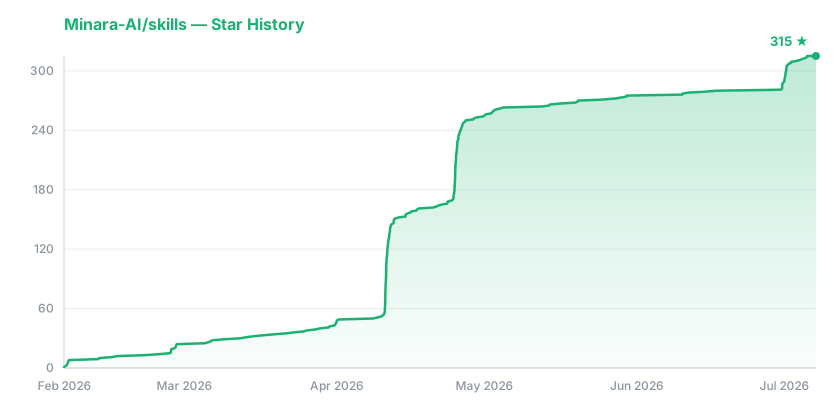
Star History