dsh-wsl-workspaceDeepSeek Harness plugin
WSL workspace support for DeepSeek Harness——无缝的 WSL 工作区使用体验,无需在 WSL 之中再安装一个dsh,安装该插件后在 GUI 里直接添加 WSL 工作区即可。WSL workspace support for DeepSeek Harness — Enjoy a seamless WSL workspace experience without needing to install dsh inside WSL. Once this plugin is installed, you can directly add a WSL workspace right from the GUI.
- Stars
- 43
- Forks
- 5
- License
- MIT
- Last commit
- Sep 2, 2026
Overview
WSL workspace support for DeepSeek Harness——无缝的 WSL 工作区使用体验,无需在 WSL 之中再安装一个dsh,安装该插件后在 GUI 里直接添加 WSL 工作区即可。WSL workspace support for DeepSeek Harness — Enjoy a seamless WSL workspace experience without needing to install dsh inside WSL. Once this plugin is installed, you can directly add a WSL workspace right from the GUI.
Original README
Cached from the project repository on Sep 3, 2026. This is source content, separate from the Agents.md review above.
dsh-wsl-workspace


English · 中文 · 日本語 · 한국어 · Français · Deutsch · Español · Português · Русский
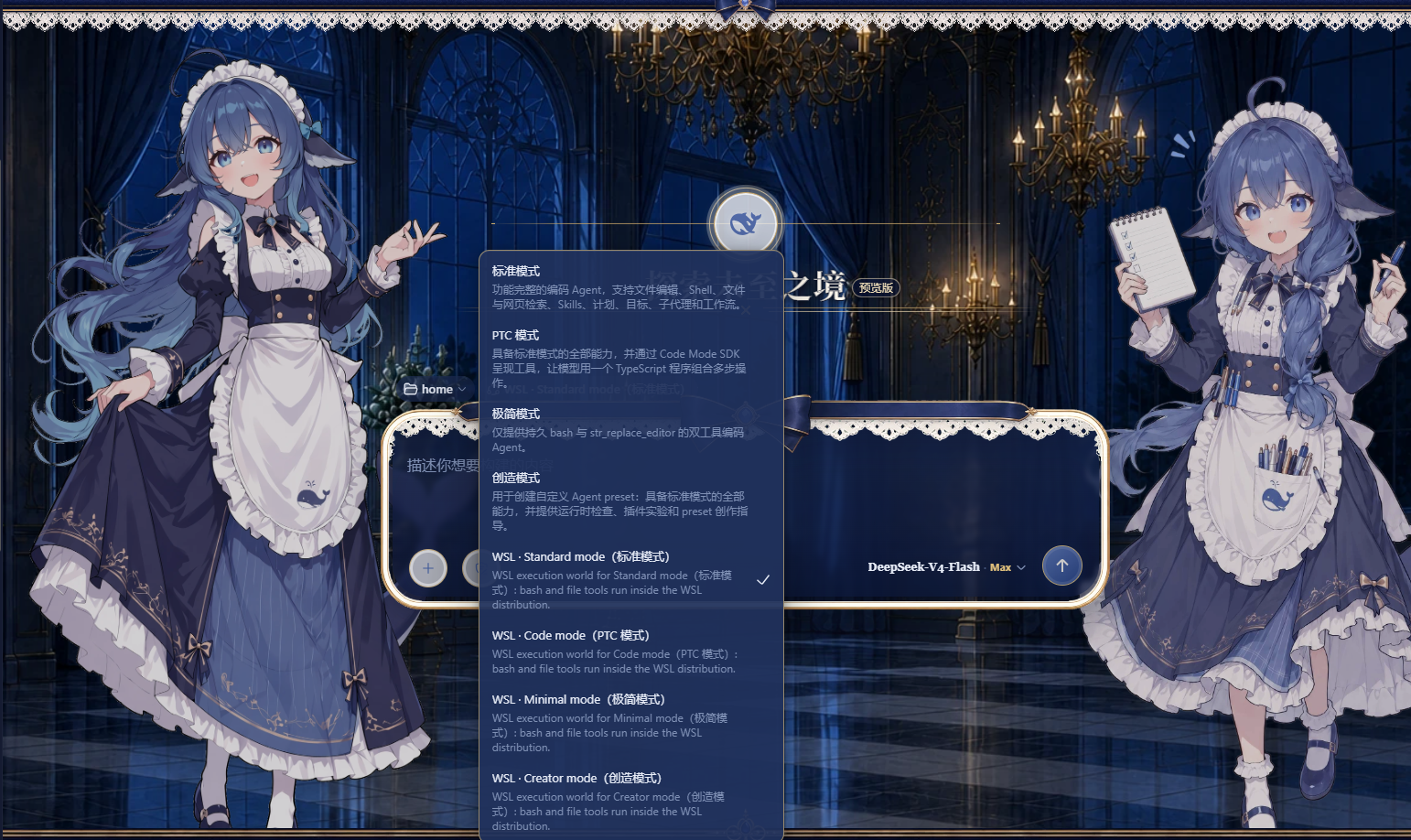 Add a WSL workspace from the DeepSeek Harness web GUI and run the whole agent session — bash commands and file reads/writes — inside a local WSL distribution with Linux paths. Nothing needs to be installed inside WSL. The session can reach both WSL and Windows at the same time: bash commands run inside the WSL distribution, while Windows files stay accessible via
 /mnt/<drive> (for example /mnt/c/Users/...).
Install
Pick one of the three ways below, then restart dsh web:
powershell# 1) npm package
dsh plugin --profile web add dsh-wsl-workspace

# 2) GitHub repository (ships the prebuilt lib/, no local build required)
dsh plugin --profile web add https://github.com/6Mikao9/dsh-wsl-workspace

# 3) Local directory (development / self-hosted)
dsh plugin --profile web add D:\path\to\dsh-wsl-workspace
After restarting dsh web, a W button appears beside Settings at the sidebar foot.
Usage
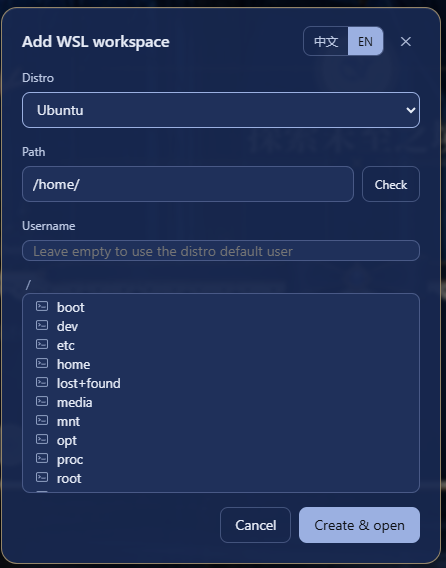
Click the W button beside Settings at the sidebar foot to open the "Add WSL workspace" dialog. Pick a distribution from the list, then browse the directory tree or type an absolute Linux path (for example /home/me/proj) — use the Check button to verify the path exists before creating the workspace. The dialog follows the DeepSeek Harness UI language. The username field is optional: leave it empty to run commands as the distribution's default user, or name a Linux user of that distribution to run the session as that user instead (equivalent to wsl.exe -u <username>). The username only changes the bash tool's run identity — the file tools go through the Windows-side WSL share and are unaffected. Each workspace's username is kept in <dshHome>/wsl-workspaces.json; delete the entry (or recreate the workspace from the dialog) to return to the default user.
Click "Create & open" to start a new session in the workspace. In the new session the bash tool executes commands inside the chosen distribution and read/write/edit operate on WSL files, so every path the model sees is a Linux path. The mode picker keeps working as usual: Standard, PTC, Minimal and Creative each land on their WSL variant automatically (the WSL variant entries in the picker are bilingual, e.g. WSL · Standard mode(标准模式)), and Windows files stay reachable from inside the session under /mnt/<drive> (for example /mnt/c/Users/...).
Behavior notes
- bash tool: runs inside the WSL distribution as the configured username (empty = the distro default user, often
root), so it can read and write anywhere in the distro. The Windows ACL sandbox cannot wrapwsl.exe— its children run on the Linux kernel side — so WSL itself is the isolation boundary and the DSH file policy does not apply to bash. - File tools (
read/write/edit): go through the Windows-side WSL 9P share and run under the DSH file policy. Underworkspace-write, reads work anywhere but writes are restricted to the session workspace; switch the file policy todanger-full-accessto also allow writes outside it. The username field does not affect the file tools. - Skill catalog: the session's skill catalog is discovered starting at the session cwd's nearest
.gitancestor (falling back to the cwd itself), then scanning downward for.dsh/skills/.agents/skills— including nested projects — bounded to 4 directory levels, 64 skill directories and 4096 visited directories. Register the workspace at the project root you work in; if the registered workspace itself sits inside a larger git repository, the scan starts at that repository's root (matching the host's own rule) and sibling projects may surface. Results are cached per scan root and served stale-while-revalidate: a fresh scan (the first lookup, and a background refresh every 10 seconds) may take a moment on very large trees — a workspace registered at the distro root/scans the whole filesystem — but repeated lookups always answer instantly and never block on a refresh. Skill bodies always load live. One substrate limit to know: the Windows-side\\wsl.localhostshare cannot resolve Linux symlinks (they read back as unresolvable entries), so a project linked into the workspace vialn -sis not discoverable — the scan walks past it without failing; register the workspace at a level that contains the real project directories instead. - The garbled
localhostport-forwarding bannerwsl.exeprints to stderr when the distro was not running yet is harmless.
Changelog
0.4.2 — 2026-09-02
- Alpha session-preset sync: blank WSL sessions now read the selected preset from both the legacy top-level field and the
0.1.2-alphaprojection, tolerate the alpha session store's removal ofnoteAgentPreset, and retry binding after asynchronous workspace/roster refreshes. - Creator-mode switching: WSL Creator variants use a namespaced, reference-counted Cordis inspection adapter, avoiding duplicate global-provider registration while the host atomically replaces the base Creator preset.
- Compatibility proof: expanded client/materialization tests and recorded isolated install/start/uninstall plus visible browser-click acceptance for every declared DSH release from
0.1.0-rc.7through0.1.2-alpha.4; the final alpha.4 run also verified all four base modes automatically map to their WSL variants with no browser warnings or errors.
0.4.1 — 2026-09-02
- Cross-release client APIs (#17): prefer the legacy namespaced API when it exists, use the alpha Typert RPC channel and named arguments otherwise, and fall back from the legacy workspace session service to
uiWorkspaceon newer releases.
0.4.0 — 2026-08-29
Follow-ups from the #12 limitation list and the #13 compatibility work:
- Lookup cache: completed skill-catalog lookups are cached per scan root and served stale-while-revalidate — the first scan of a workspace is real (seconds on large trees), every later lookup answers instantly, an expired entry never blocks (it is served immediately while a background refresh runs, so even a workspace registered at the distro root stays responsive), and
get()keeps reading skill bodies live. - Boundary hardening: UNC spellings with double separators, trailing slashes, uppercase hosts, the legacy
\\wsl$form and distro-root cwds all parse and scan correctly; skill files saved as UTF-8 with a BOM or with CRLF line endings (including CRLF block scalars) now parse; unreadable directories prune without failing the scan; a name+description+body fingerprint guarantees aliased skill files never publish twice. - Symlinked projects — investigated, substrate-limited: the discovery walk now recognizes directory symlinks explicitly and prunes them safely (no crashes, no loops). Following them is not possible over the
\\wsl.localhost9P share — the Windows side cannot resolve Linux symlink targets (probed:readlink→EISDIR,stat/readdir→ENOENT) — so a project linked into the workspace vialn -sstays undiscoverable; a name+body fingerprint dedupe also guarantees aliased skill files can never publish twice on substrates that do resolve links. - Block-scalar frontmatter:
description:/whenToUse:written as YAML block scalars (|literal,>folded) now parse — such skills were silently dropped before. - Compatibility manifest:
dsh.compatibility.dshReleasesdeclares per-release compatibility with the official DSH versions, backed by reproducible disposable-Profile install/start/uninstall evidence (scripts/verify-dsh-compat.sh), andenginesdeclares the Node.js floor. - Guard scripts:
scripts/check-rank-parity.mjsfails the release when the copied project-rank constants drift from the host'sdsh-skill-filesystem.
0.3.2 — 2026-08-29
- WSL workspace sessions now inject nested-project skill catalogs (#10):
.dsh/skillsand.agents/skillsdirectories of projects nested below the registered workspace root are discovered and published with the host's project ranks and sources, so the model sees the same skill catalog it would see when the session cwd is the project folder itself. Discovery is depth- and budget-bounded, prunesnode_modules/dot-directories, and leaves non-WSL sessions untouched. - Host-parity scan root: lookups from inside a project subtree resolve the nearest
.gitancestor first, so the enclosing project's skills stay visible from deeper cwds; skills above that ancestor do not leak. - Hardening: the skill-root budget is enforced per push, and the
skills.registerProvidercall is guarded so a host whoseskillsservice has a different shape can no longer break plugin load. - Housekeeping: removed stale prebuilt
lib/chunks that shipped dead vendor code (including an inlined schemastery copy that triggered dsh.so'snew Functionstatic rule); addedscripts/repro-setup.shplus a nested skill-catalog regression suite, and a matching TESTING.md section.
License & attribution
MIT — see LICENSE and NOTICE. The NOTICE precisely lists:
- Adapted/inherited source code: DeepSeek Harness (MIT) —
dsh-bash-local(executor mechanics),dsh-fs-local(WslFileSystemsubclasses it), and the shipped agent presets (read and transformed by the variant generator); - Design references (no source copied): dsh-bash-terminal (MIT, wsl argv / WSLENV approach), dsh-side-panel (BSD-3-Clause, host-route pattern), vpshub (MIT, roadmap reference).
Keep LICENSE and NOTICE when redistributing.
Acknowledgments
Special thanks to dsh-deep-whale (DSH Web 鲸鱼娘 skin series · 深海女仆工坊 maid-atelier, CC BY-NC-SA 4.0): the whale girl skin plugin brings a full set of adorable skins to the DeepSeek Harness Web UI and makes daily use of DSH a warmer experience.