dsh-worktableDeepSeek Harness plugin
🖥️ Agent-project workbench for DeepSeek Harness — sidebar app drawer + dockable split workspace + a live control room watching every project.
- Stars
- 461
- Forks
- 58
- License
- MIT
- Last commit
- Sep 2, 2026
- Latest release
- v0.3.0
Overview
🖥️ Agent-project workbench for DeepSeek Harness — sidebar app drawer + dockable split workspace + a live control room watching every project.
Original README
Cached from the project repository on Sep 3, 2026. This is source content, separate from the Agents.md review above.
dsh-worktable 🖥️
English · 简体中文
An agent-project workbench for DeepSeek Harness — a sidebar app drawer that turns every project into dockable windows, plus a built-in control room that watches them all in real time.
📸 Screenshots
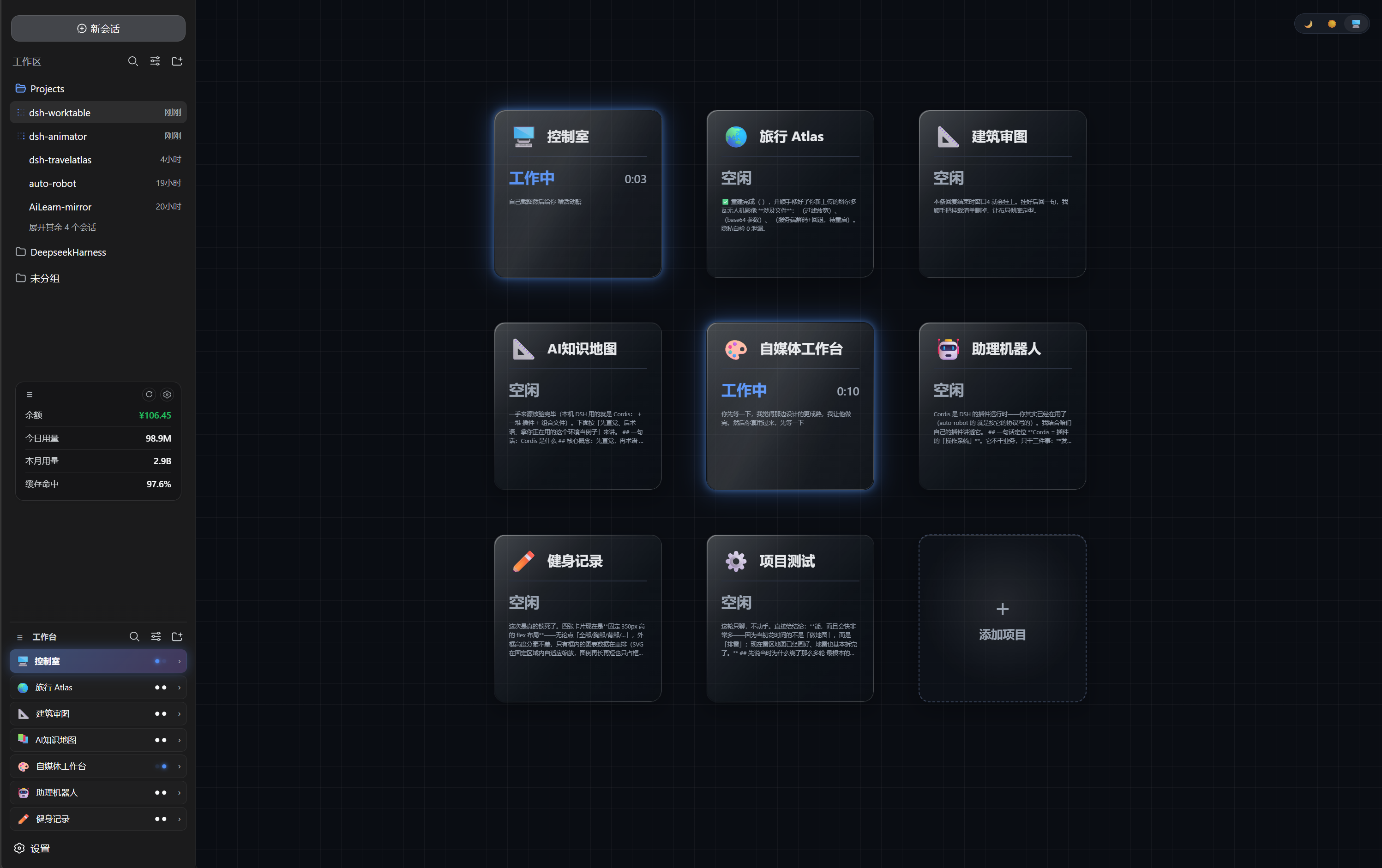 | 🖥️ Control room — the built-in default project: a live card grid watching every project (working / needs you / done) with glassmorphism cards on a blueprint grid |
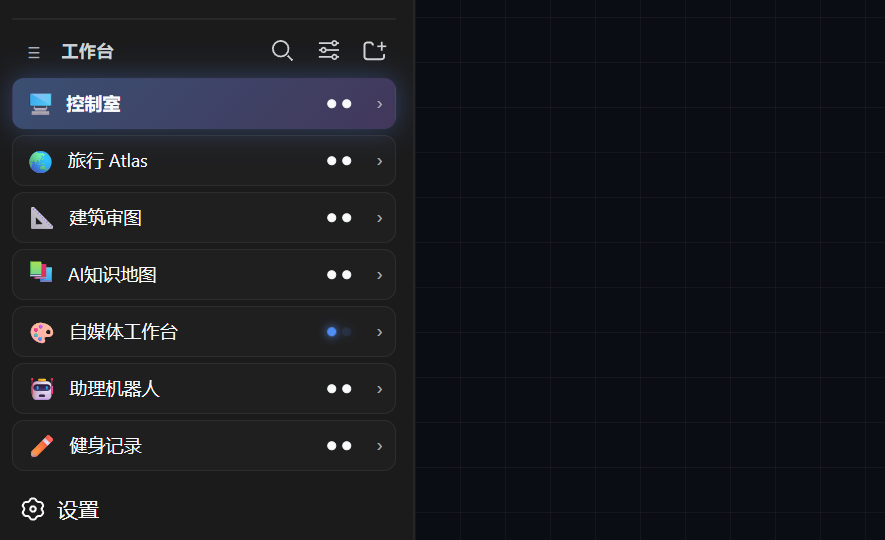 | 🧩 Worktable sidebar — the app drawer: projects, shortcuts and the pinned control-room entry |
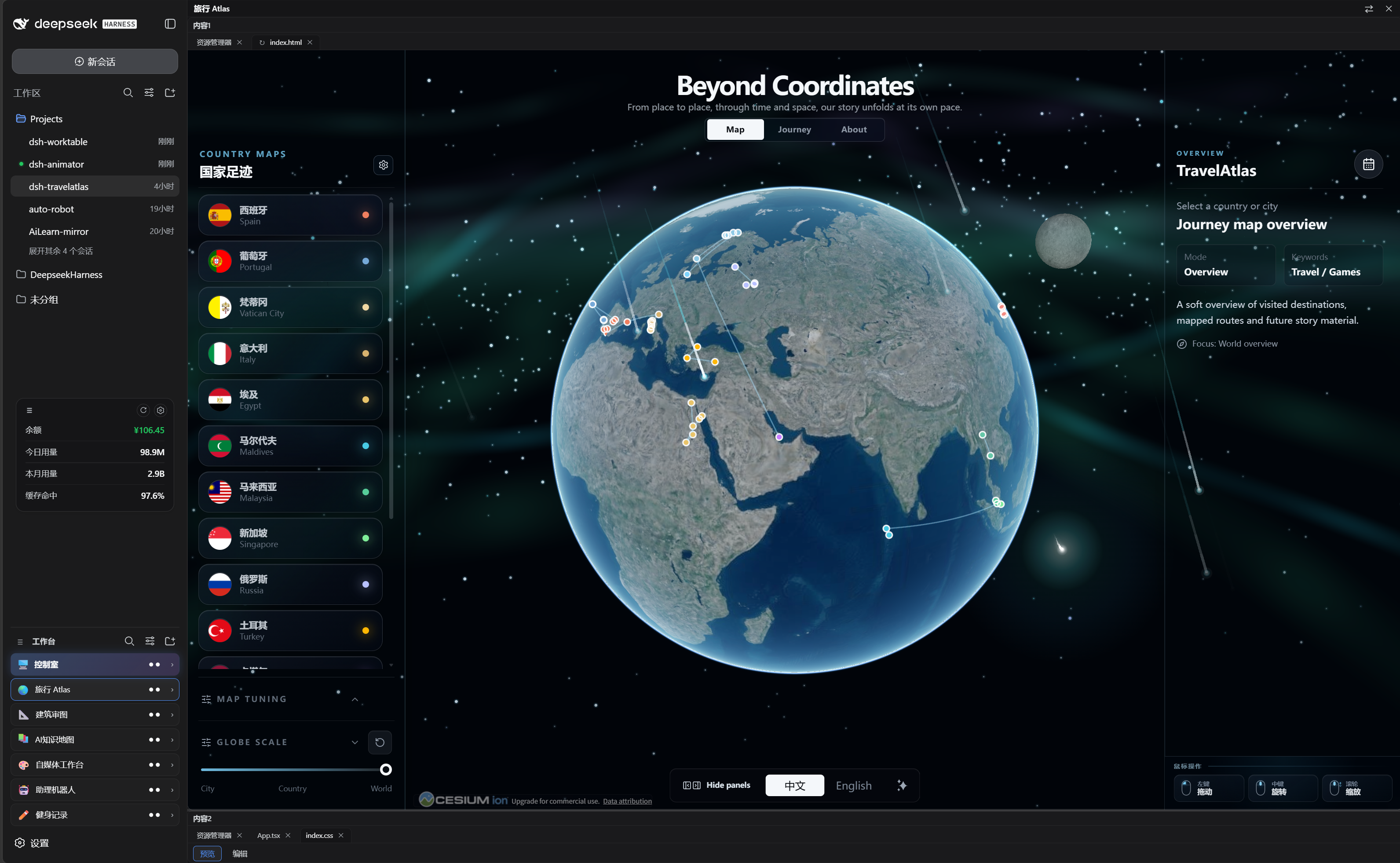 | 🪟 Our projects — every project opens as a dockable split workspace (resident apps like Travel Atlas included) |
✨ Feature tour
🧩 Sidebar app drawer
- Collects your self-hosted projects (and resident plugins like dsh-travelatlas) in one place
- Rename / icon / reorder / hide each project; per-project folder; project ↔ conversation binding — opening a project switches the chat pane to its bound conversation
- Collapse the sidebar and every project becomes a tappable square tile (icon only)
🪟 Dockable split workspace
- Declarative layout presets (left column / top row / main grid + right chat pane)
- Draggable dividers, per-pane tabs, per-layout width persistence
- Built-in panes: file explorer, terminal, browser, animation site, custom window
- Custom window: send a requirement to a new or existing conversation; the agent builds it and the result auto-mounts into the window (locked)
🖥️ Control room (built-in default project)
- A pinned, undeletable first project — bind one management conversation on first open
- 3-column card grid mirrors every project: working / needs you / done with live runtime, subagent counts and a cleaned message preview
- Event-driven host snapshot mirroring — zero polling, zero tokens
- Glassmorphism cards, dark / light / system theme, neon status glows and a rotating comet on busy cards
At a glance
| 🧩 Plugin type | Cordis plugin — host routes + web client, pure additive (no official plugin replaced) |
| 🪟 Workspace engine | Self-built split engine rendered into the host shell overlay seat |
| 💬 Chat pane | Reuses the host conversation — the plugin only selects sessions (sessions.open) |
| 📡 Status data | Mirror of the host session runtime snapshots (subscription-driven) |
| 💾 State | localStorage only (dsh.worktable.*); no workspace files touched |
| 🎨 UI | TypeScript + React (host externals) + vanilla CSS, dark-first with light theme |
Quick start
-
Install (pick one):
A · one-liner (recommended) — straight from the GitHub Release tarball, no Git needed:
bashdsh plugin --profile web add "https://github.com/Aisland-SJL/dsh-worktable/releases/latest/download/dsh-worktable.tgz"B · local clone (for hacking on the source) —
link:accepts a local absolute path only (no spaces in the path):bashgit clone https://github.com/Aisland-SJL/dsh-worktable.git dsh plugin --profile web add "link:<absolute path of the cloned dsh-worktable directory>/01_content" # e.g. cloned into D:\tools → dsh plugin --profile web add "link:D:/tools/dsh-worktable/01_content"Either way the
addcommand registersdsh-worktablein the profile bundle list (writes to~/.dsh, may ask for authorization). If thedshcommand is missing, usenpx @deepseek-ai/dshinstead. -
Restart the DSH web process, refresh the GUI
-
Open the control room: click the pinned 🖥️ control-room card → bind one conversation (join existing or create new) → you get the live card grid
-
Create projects: sidebar + → pick a layout preset, set a project folder
Architecture
One package ships the host Cordis plugin and the web client:
- host:
/api/worktable/*routes — health, file system, git, file read/write, site serving, mkdir, workspaces, native skin template; WebSocket/api/worktable/termfor the terminal pane (PowerShell on Windows) - client: injected into the sidebar and the shell overlay via the slot protocol; the split engine, tab model, drag/drop and persistence are self-built
- control room: reads the host session list snapshot (running / pending / completed, jobs, subagent catalogs) — an event-driven mirror, no model involvement
- window tasks: the agent writes
widget-result.jsoninto the project folder on completion; the client mounts the artifact into the addressed window and locks it
Development & testing
bashcd 01_content
npm install
npm run build     # lib/index.js + lib/client.js
node --check lib/index.js
- Build must run inside
01_content— building from the repo root writeslib/to the wrong place while the host keeps loading the old bundle - The client bundle keeps the
window.__ModuleLoader__.loadhandshake;reactand@deepseek-ai/*stay external - Regression:
04_test/functional-diag.cjs(20 steps, strict gate) plus targeted probes (control room, bind panel, collapsed rail, model inheritance), the path matrix (04_test/pathutil-matrix.cjs) and update-check scenarios (04_test/probe-update-scenarios.cjs)
Troubleshooting
Q: After a DeepSeek Harness update, the worktable fails to open / the service fails to start?
Don't panic: your data is safe — projects, bindings and layouts live in the browser (localStorage), and project files stay in your own project folders; upgrading or repairing never touches them. Pick the case that matches:
Case A: Harness works, only the worktable needs updating
-
Open the worktable "Settings" → click "Check now"; when the amber update badge appears next to the worktable title, click it and choose "Copy AI prompt" to hand the upgrade to your AI assistant;
-
Or simply re-run the install command (always installs the latest), then restart dsh web and refresh:
bashdsh plugin --profile web add "https://github.com/Aisland-SJL/dsh-worktable/releases/latest/download/dsh-worktable.tgz"
Case B: Harness itself is down (service fails to start / "Failed to load plugins")
- First choice: upgrade Harness to the latest (official fixes usually ship there): run
npx @deepseek-ai/dsh web; - If it still fails: copy the following to any AI assistant (Claude, Codex, GLM, … — DeepSeek Harness itself is not required):
Help me fix DeepSeek Harness custom-plugin loading (the error is usually "Failed to load plugins" or the service failing to start):
- Run npx @deepseek-ai/dsh web to upgrade to the latest and start; if it works, done.
- If it still fails: open ~/.dsh/profiles/web/package.json, find every dependency starting with link:, and compute their common parent directory (e.g. if all plugins live under D:\projects, the parent is D:\projects).
- Create a node_modules directory junction in that parent pointing to ~/.dsh/profiles/node_modules: mklink /J "\node_modules" "%USERPROFILE%.dsh\profiles\node_modules"; if that parent already has a node_modules, retry one level up.
- Restart dsh web and open http://127.0.0.1:3080 to confirm the worktable is back.
This issue has been reported to the DeepSeek Harness team and is being fixed; upgrading after the fix ships resolves it permanently.
Point-to-annotate 📌
Every window title bar has a small annotate button (chat-bubble with a plus) next to the collapse toggle. Click it, your cursor becomes a blue speech bubble — click anywhere in a window to drop an input box, type what you want changed ("make this text bigger"), and hit ✓. The message is packaged (window number + coordinates + the clicked element + your request), filled into the chat input without sending — press Enter when ready, and the agent works through the annotation protocol (verify with a screenshot or the window, or ask one targeted question instead of guessing).
- Point and speak — no verbal location description needed.
- The payload is self-explaining: any agent, in any conversation, can pick it up.
- Same behavior for every user — no local setup, no special tools.
- Same family of polish: the console gains a 5th dock button Changelog (version notes / check for updates / copy-upgrade command) and ships two default background presets (aurora gradient + coastal view) in the custom background library.
Known limits
- Platform: Windows is the fully tested platform. macOS support is experimental: the core file-path code has been adapted for cross-platform use, but no end-to-end test has been completed on macOS hardware.
- State lives in the browser (
localStorage) — projects, bindings and views do not sync across machines - The terminal pane is a plain PowerShell host on Windows (no PTY feature parity with the native terminal app)
- Auto-mount requires the agent to actually write
widget-result.jsonin the project folder - The control room monitors projects that are bound to a conversation; unbound projects show as idle
Privacy
No telemetry, no network calls beyond the host APIs and the plugin routes. All user state stays in localStorage. Optional update check: a read-only GET to the GitHub Releases API (automatic at most once a day, plus a manual "Check now" button); nothing is uploaded, and it can be disabled in Settings.
License
MIT
Related
- dsh-reminder — cross-window completion & approval notifications
- dsh-usage — persistent balance/usage dock