dsh-personal-centerDeepSeek Harness plugin
DSH 个人配置:Token 用量统计 / 成本估算 / 自定义指令 / 外观全局字号 / 桌面宠物(含会话状态概览),纯本地不联网。Personal center for DSH: usage stats, cost estimation, custom instructions, global font size & desktop pet with session overview — all local & offline.
- Stars
- 37
- Forks
- 1
- License
- MIT
- Last commit
- Sep 2, 2026
- Latest release
- v1.1.0
Overview
DSH 个人配置:Token 用量统计 / 成本估算 / 自定义指令 / 外观全局字号 / 桌面宠物(含会话状态概览),纯本地不联网。Personal center for DSH: usage stats, cost estimation, custom instructions, global font size & desktop pet with session overview — all local & offline.
Original README
Cached from the project repository on Sep 3, 2026. This is source content, separate from the Agents.md review above.
dsh-personal-center
A local, offline personal center for DeepSeek Harness — usage stats, cost estimation, custom instructions, global font size, and a desktop pet.
A local plugin for DeepSeek Harness (DSH) desktop / web. Adds a Personal Center section to Settings, with four tabs:
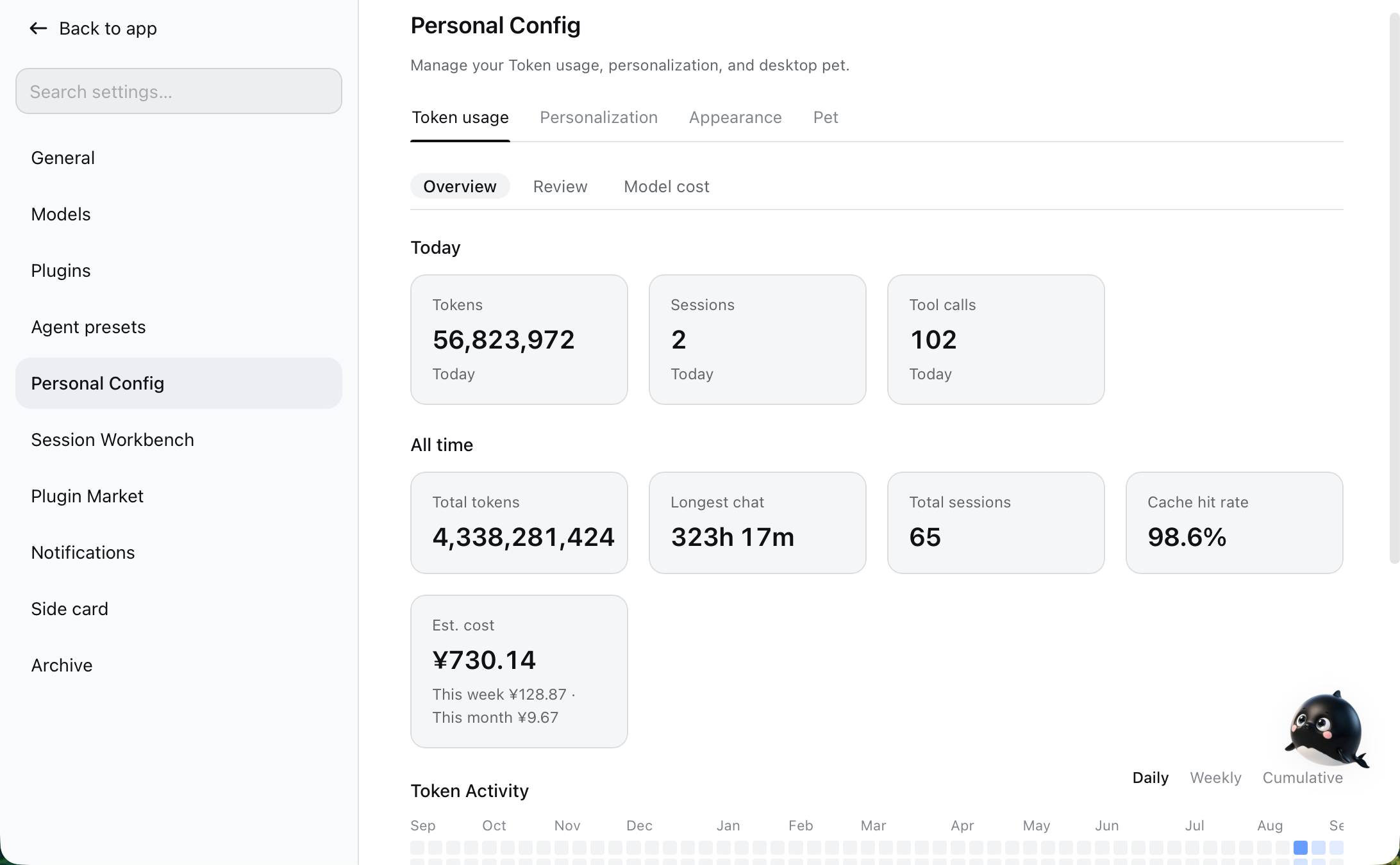
- Token Usage — real usage stats: today / cumulative tokens, session count, tool calls, a GitHub-style activity heatmap (daily / weekly / cumulative), per-model breakdown, top tools, and session review; with sub-tabs (Overview / Review / Model Cost).
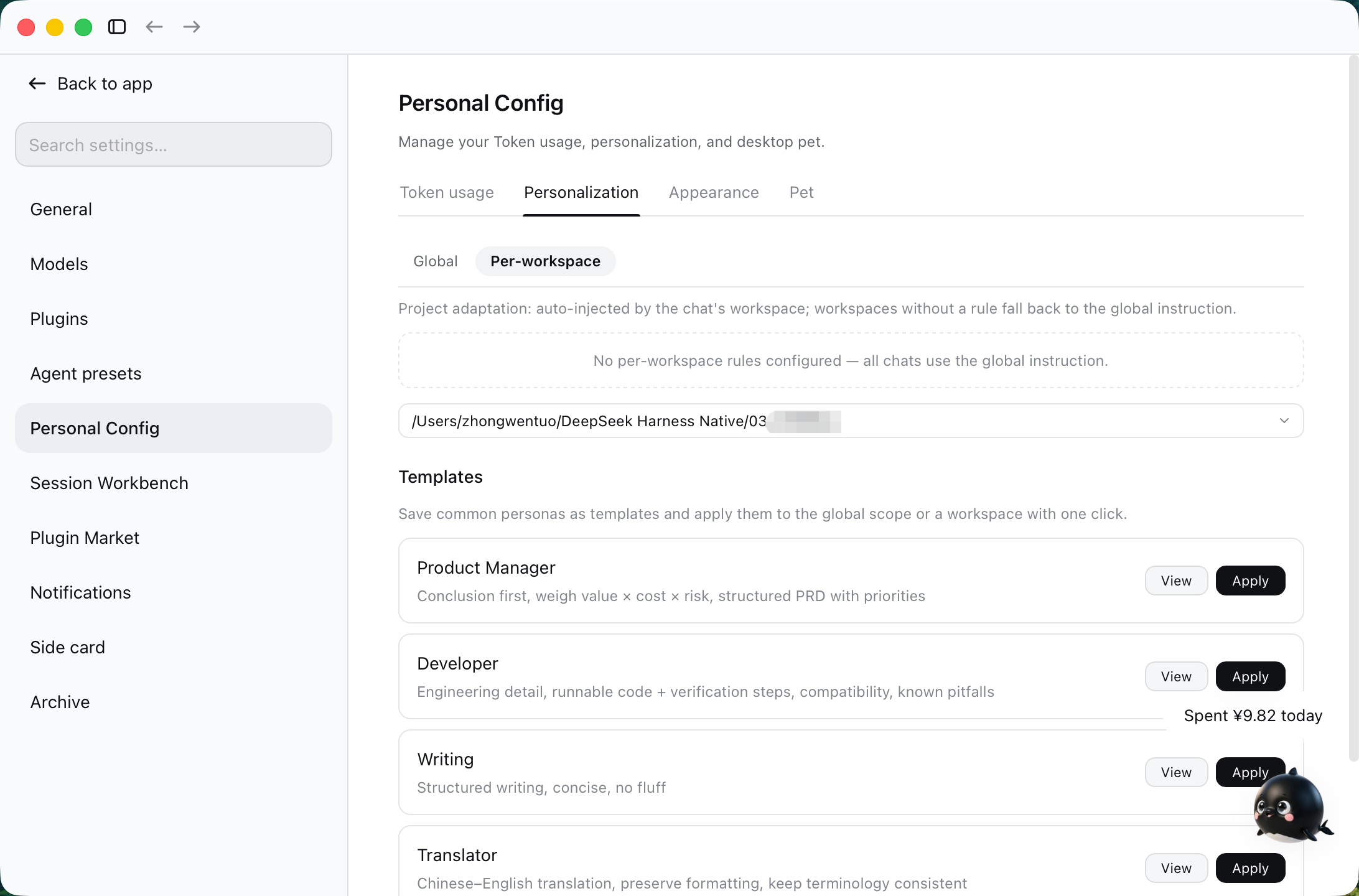
- Personalization — global custom instructions (like ChatGPT / Codex "Personalization → Custom instructions"), applied to all chats on this machine.
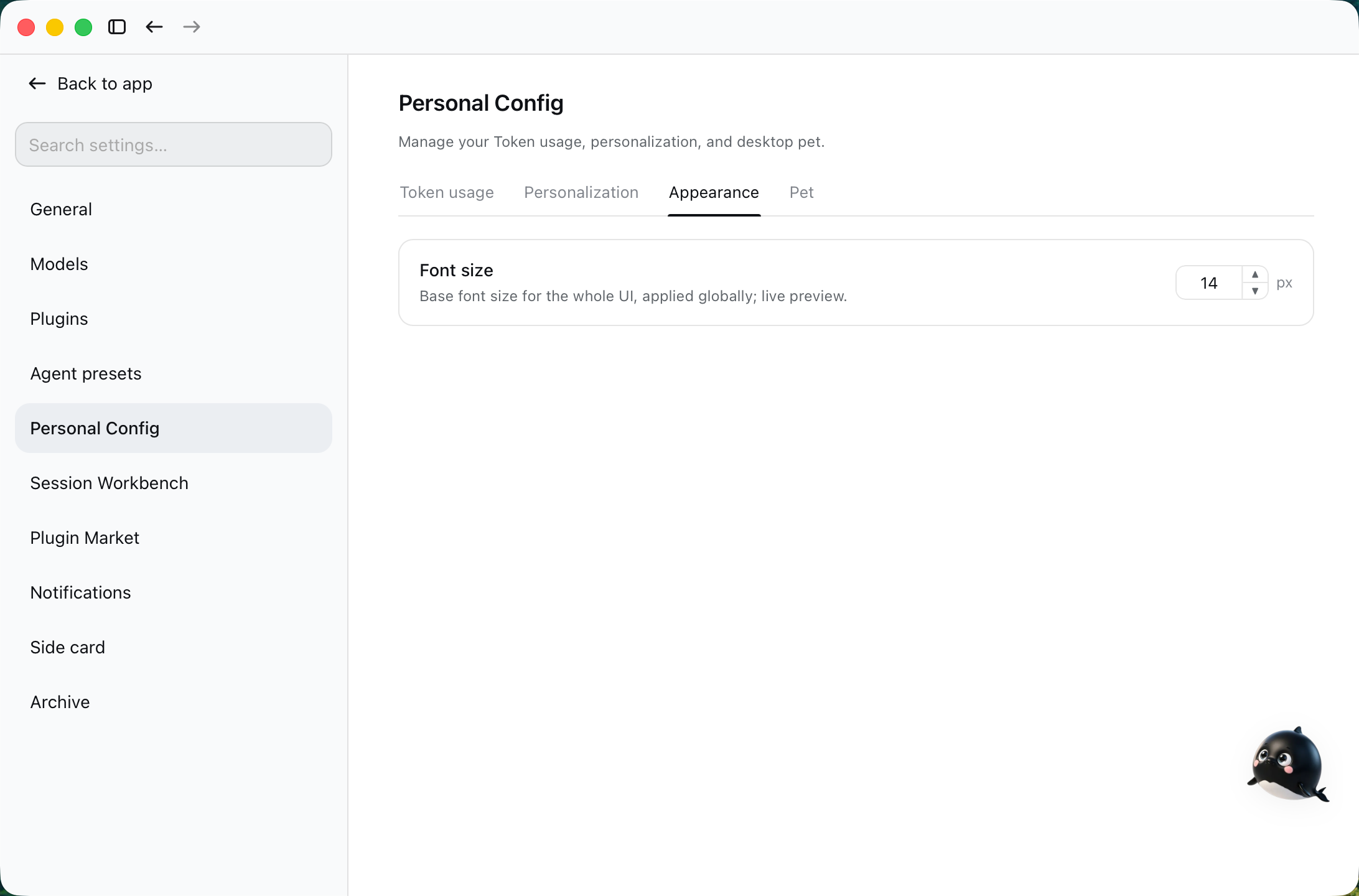
- Appearance — a global font-size stepper (default 14, range 11–16, step 1): scales the whole UI instantly and remembers your choice.
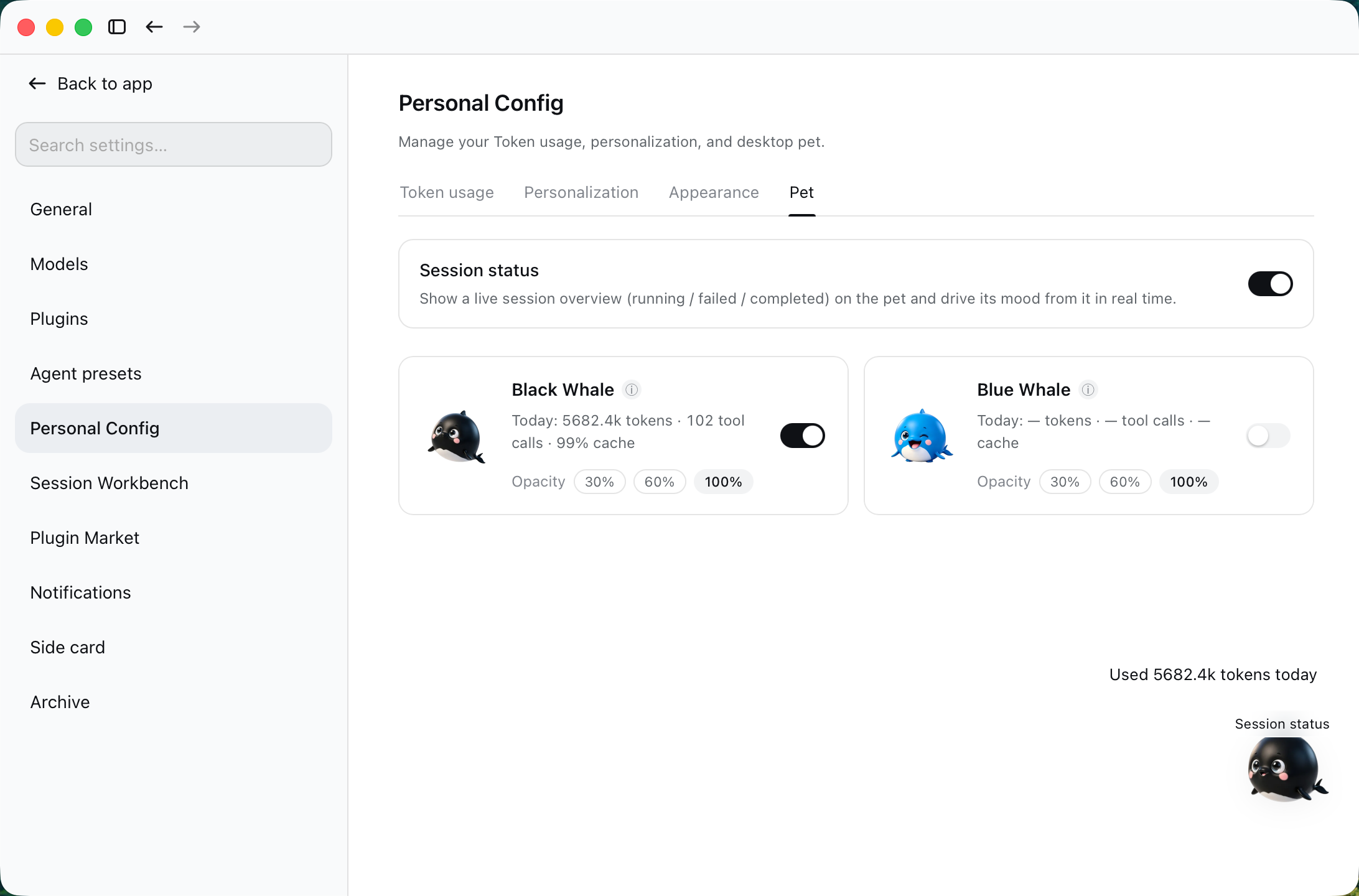
- Desktop Pet — bitmap (black / blue whale) and vector ("round black / round blue") skins, driven by your real usage (5 emotions), with a session-status overview (double-click a session to jump into it).
Model cost estimation lives inside Token Usage: per-model pricing (peak / off-peak, per currency, official presets) plus cache-hit-rate stats.
100% local — no network, no reading chat content. See PRIVACY.md. Bilingual UI (中文 / English), follows DSH's language automatically.
📸 Screenshots
Four tabs (v1.0)
| Token Usage | Personalization |
|---|---|
 |  |
| Appearance (global font size) | Pet |
|---|---|
 |  |
Feature details
| Token Usage · light | Review · dark |
|---|---|
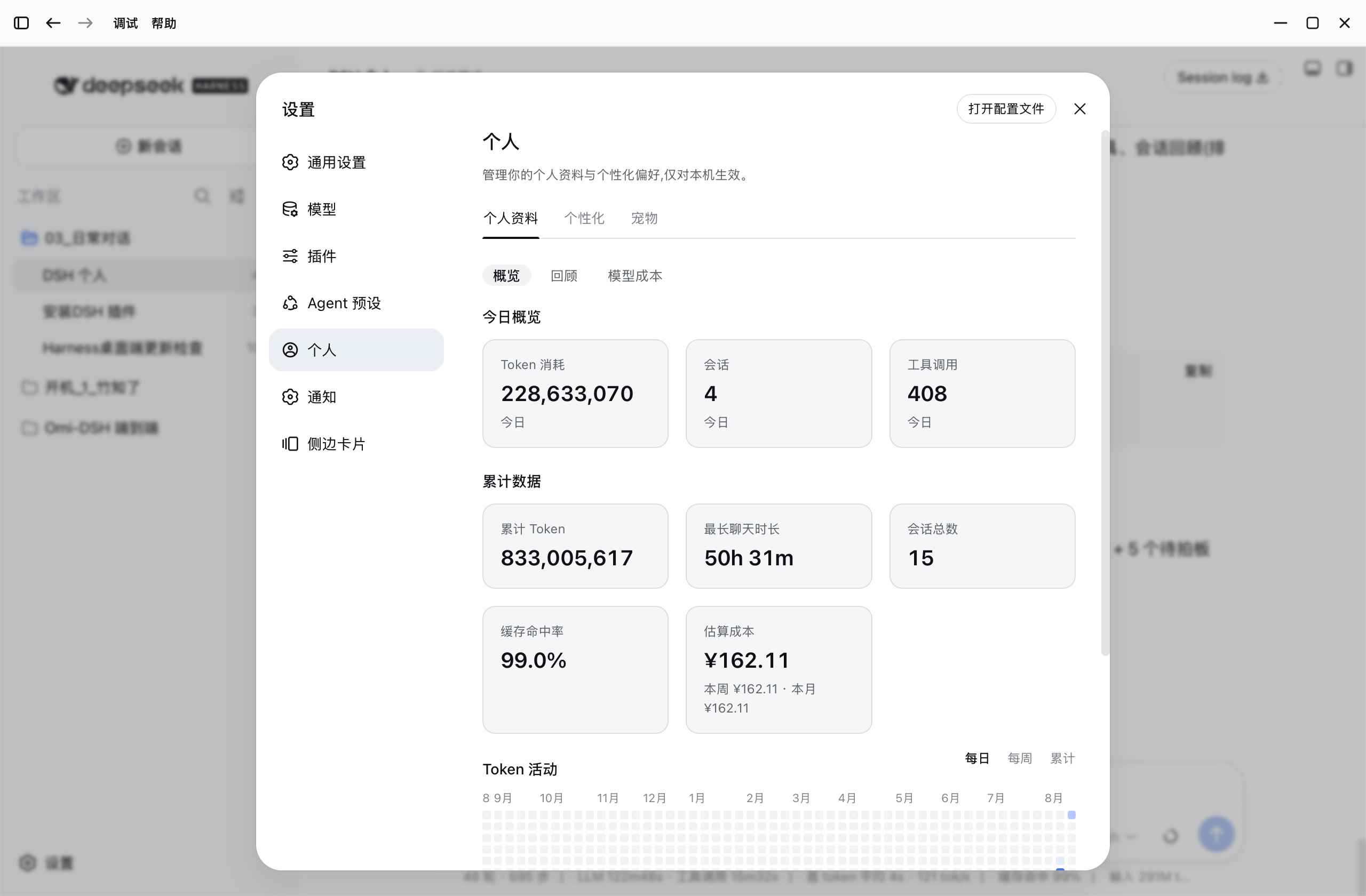 | 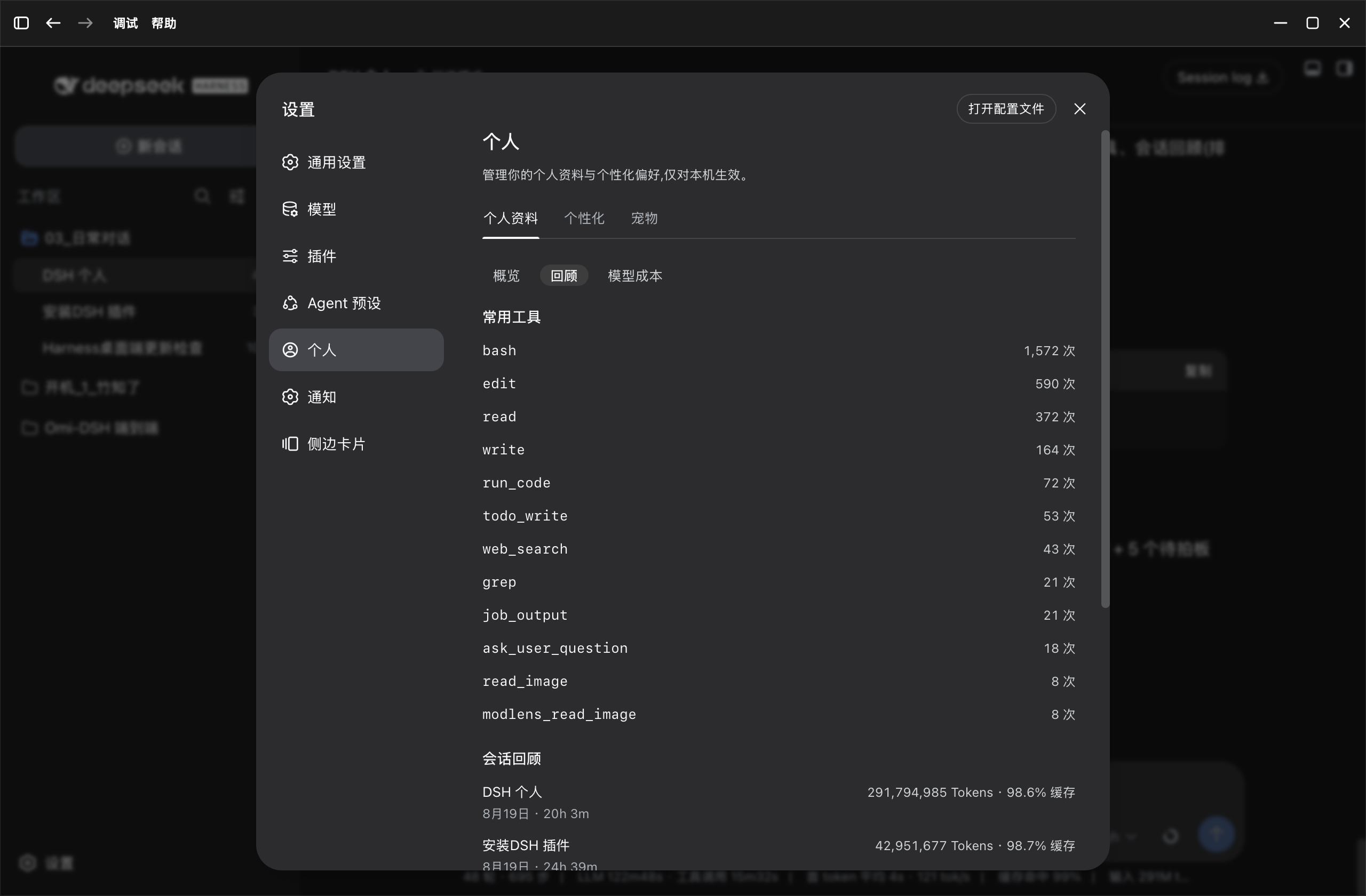 |
| Pet panel · light | Pet panel · dark |
|---|---|
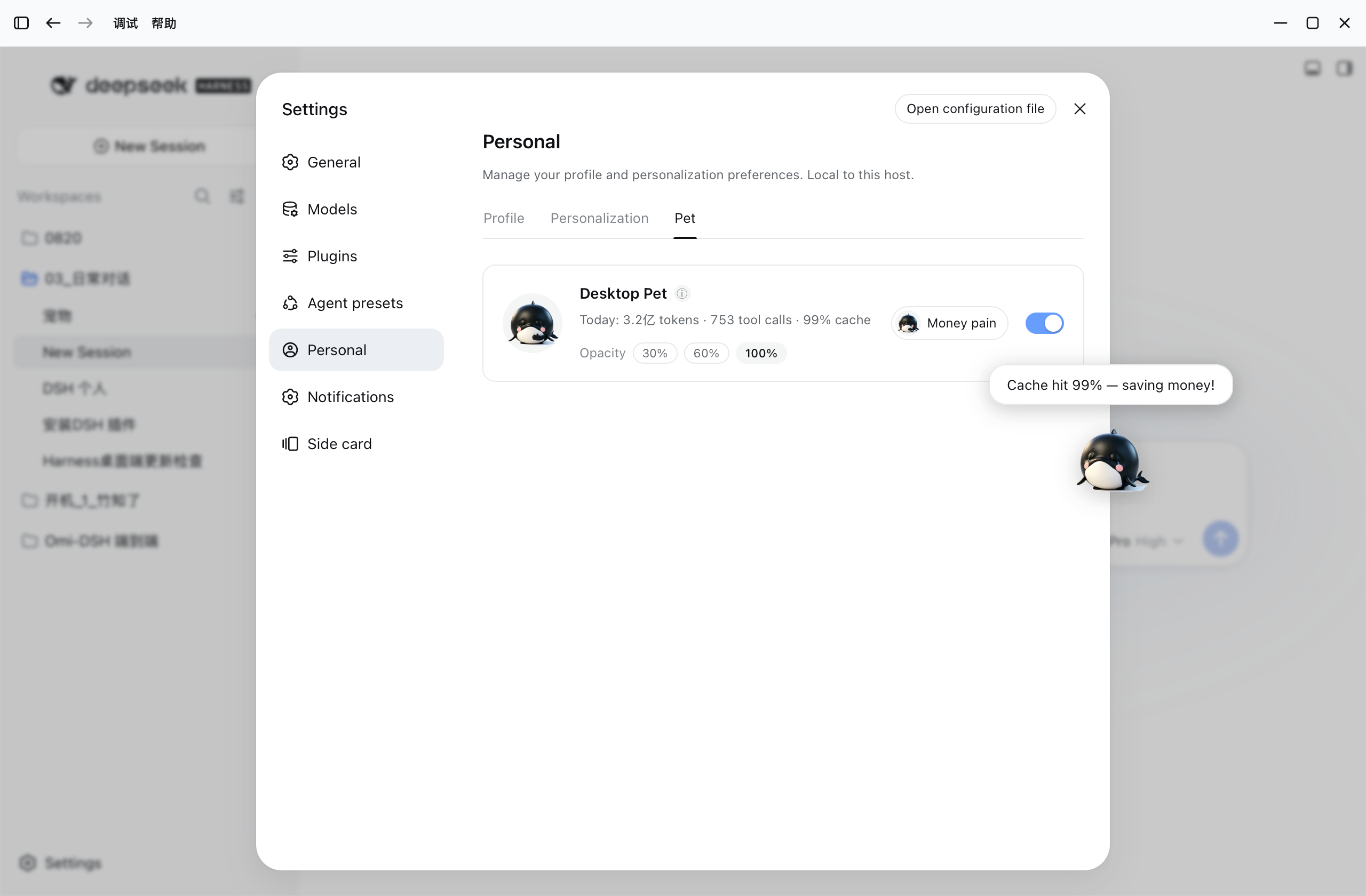 | 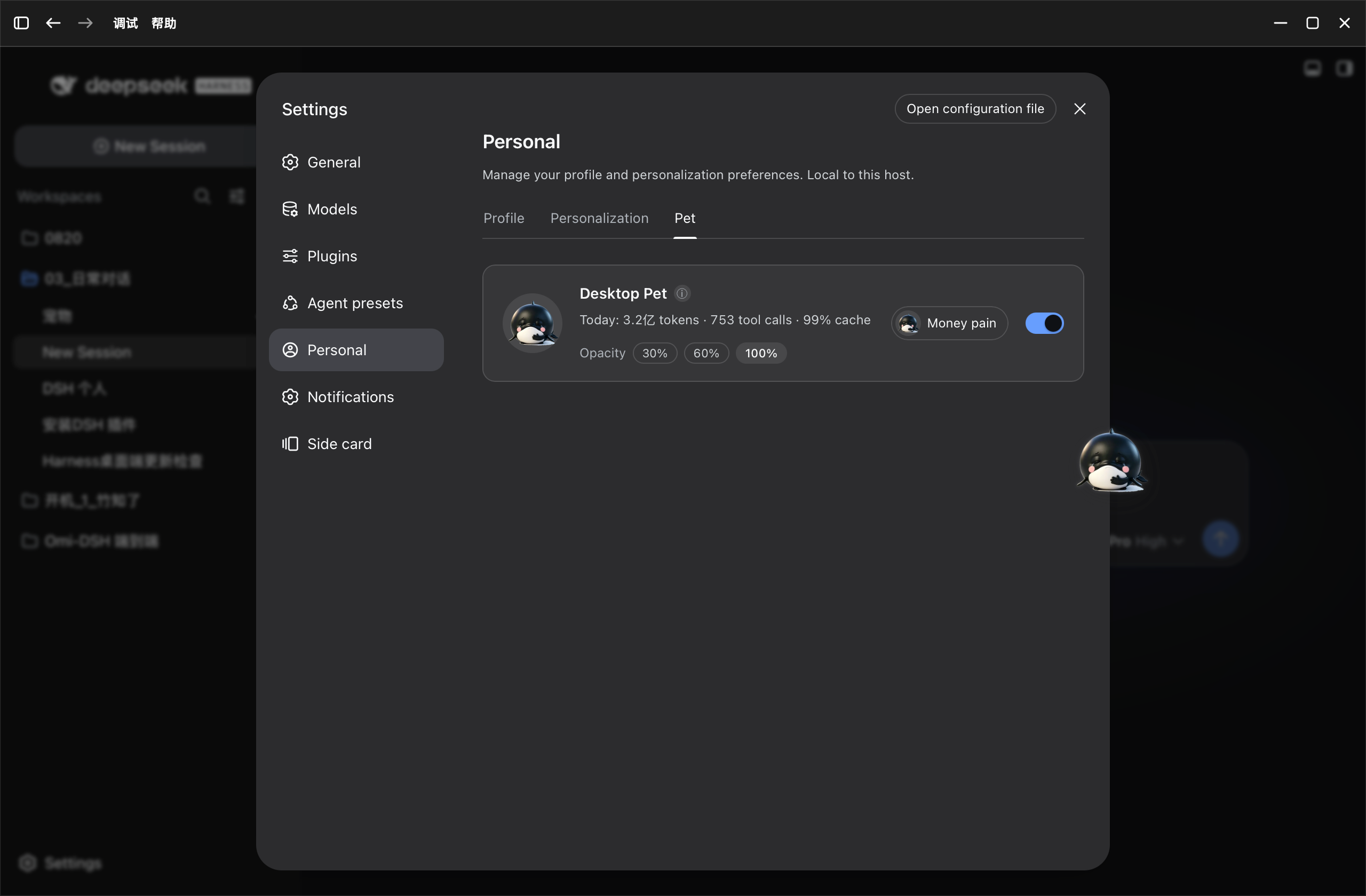 |
| Session status overview (double-click to jump) |
|---|
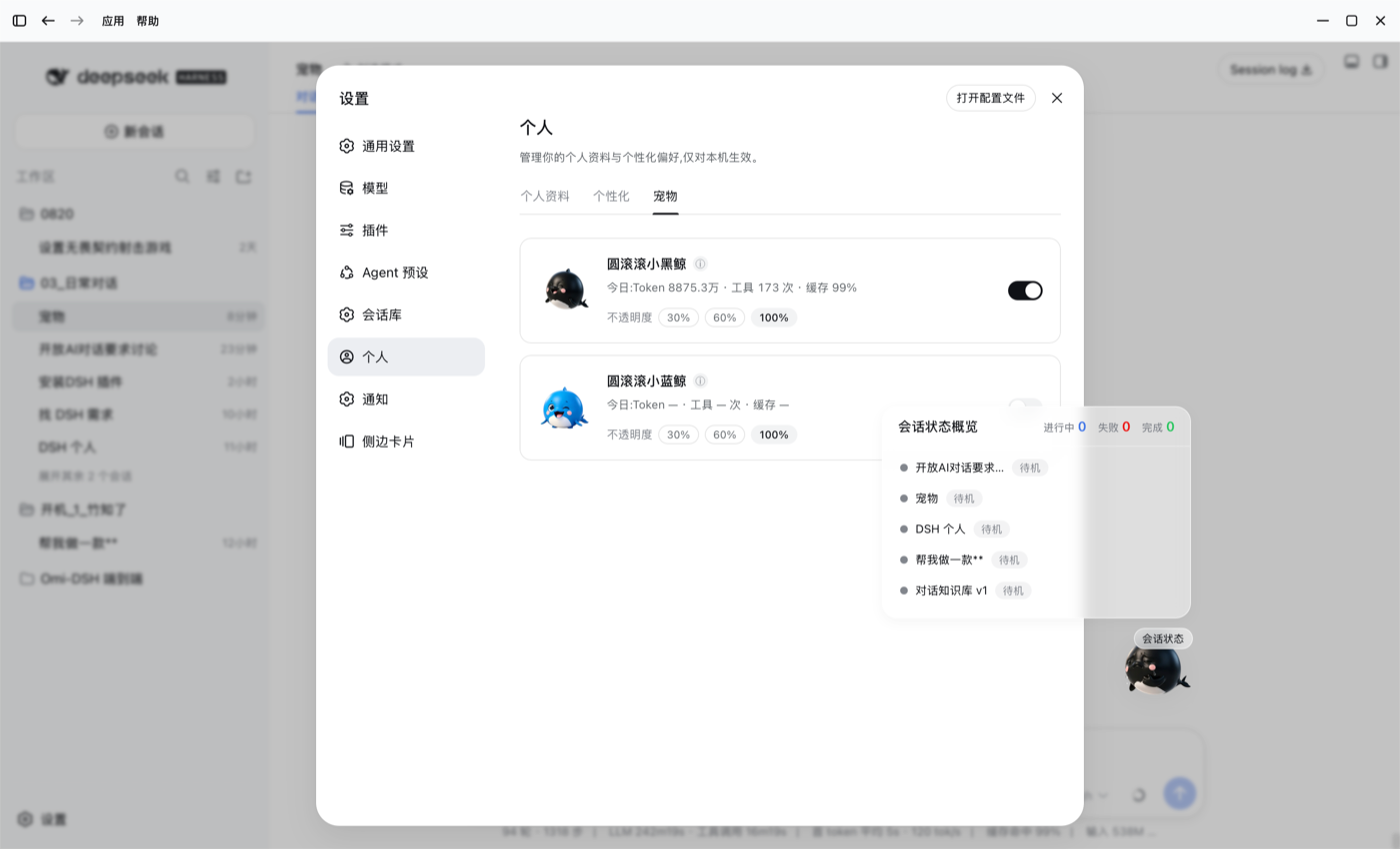 |
Five emotion animations (happy / busy / tired / wallet-pain / dozing):
| Black whale | Blue whale |
|---|---|
 |  |
New actions (v0.8.0) (thinking / waiting / celebrate / drag / wave):
| Black whale | Blue whale |
|---|---|
 |  |
| Model cost · dark |
|---|
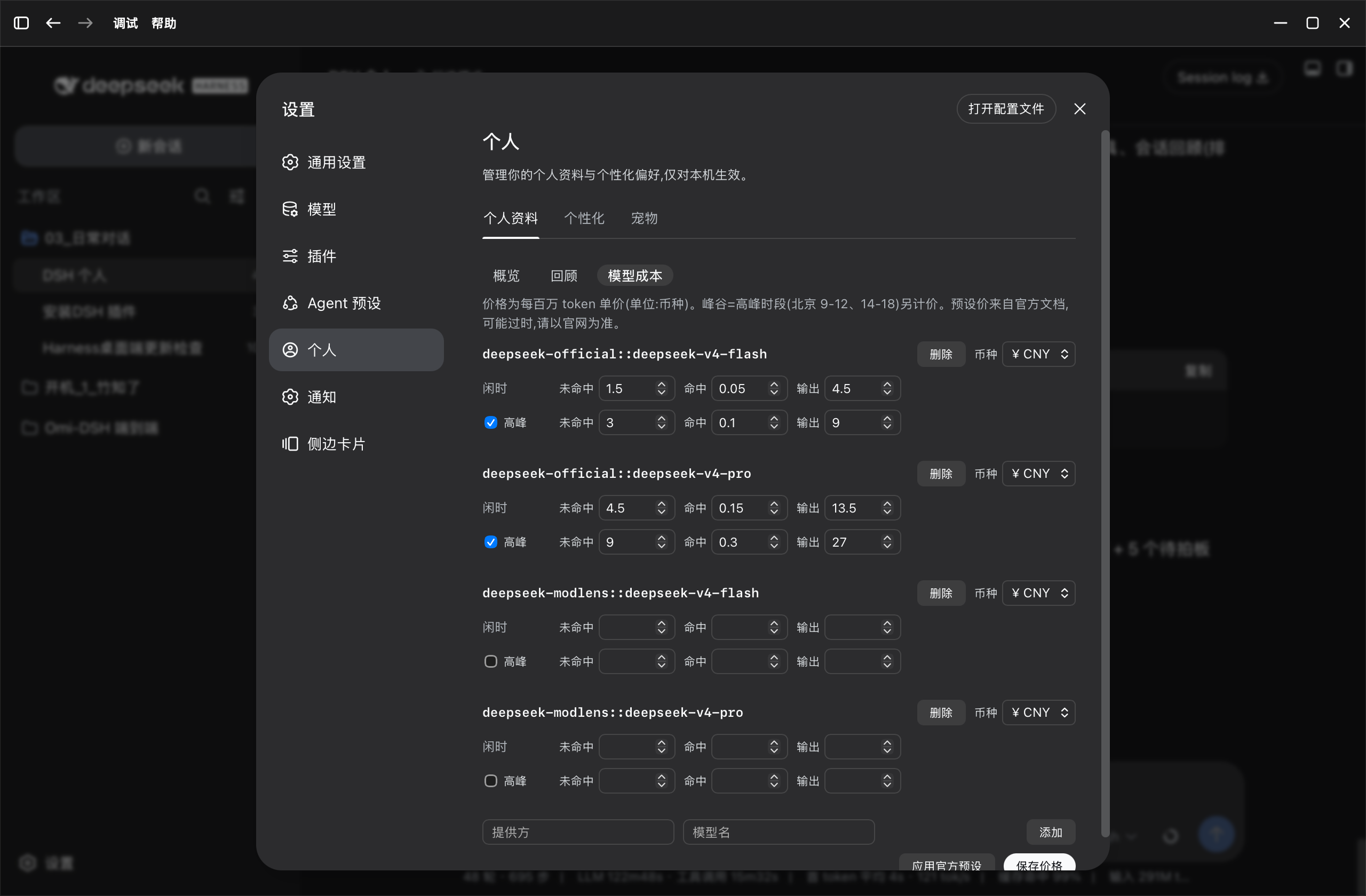 |
| Personalization · per workspace (layered instructions + templates) |
|---|
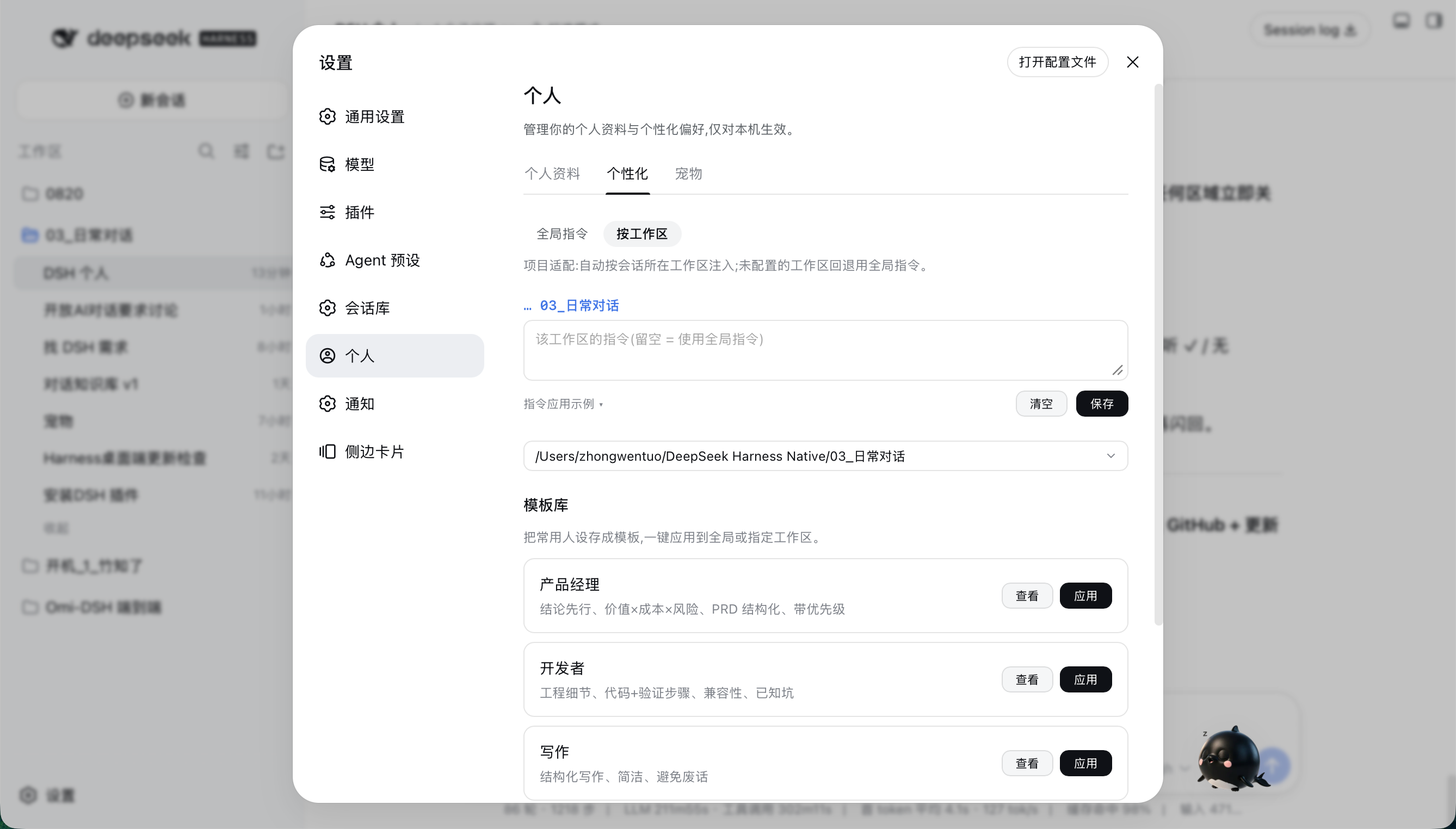 |
✨ Features
Token Usage (statistics)
- Today overview: token consumption / sessions / tool calls;
- Cumulative data: total tokens / longest chat / total sessions / cache-hit rate / estimated cost;
- Token activity: GitHub-contribution-style heatmap with daily / weekly / cumulative views;
- Per-model breakdown: tokens, requests, per-model cache-hit rate and cost split by provider + model;
- Top tools: sorted by call count (including MCP tools in
mcp__<server>__<tool>form); - Session review: recent sessions (title / date / duration / tokens / cache-hit rate), auto-excludes archived sessions.
Data source: aggregates local session logs in real time — numbers only, never reads content. See docs/common/DESIGN.md.
Model Cost (estimation)
- Per-model cost per million tokens, split by currency (¥/$);
- Peak / off-peak pricing (DeepSeek official: Beijing 9:00–12:00 & 14:00–18:00 peak, off-peak = half);
- Built-in presets (deepseek / kimi / gemini / gpt) with provider→model autocomplete, editable;
- Shows this week / this month / cumulative cost.
Personalization (layered instructions: v0.7)
- Global instructions (identity baseline): identity / working principles / response preferences, applied to every chat on this machine;
- Per-workspace instructions (project-specific): each workspace gets its own instructions, injected by longest-prefix cwd match as "global + workspace" merged text; unconfigured workspaces fall back to global only;
- Template library: 5 built-in templates (PM / developer / writing / translator / general assistant), one-click apply to global or current workspace; save / edit / delete your own;
- Injection preview: live "global + current workspace" merged text + ≈token estimate at the bottom;
- All local (settings.yaml), zero network, no migration of existing
custom-instructionsdata; bilingual, DSH design tokens.
Appearance (global font size: v1.0)
- New "Appearance" tab with a global font-size stepper: default 14, range 11–16, step 1, instant preview, saved to local
localStorage; - The engine scans all stylesheets for DSH
--dsw-font-*tokens and hard-coded font-size rules, then offsets everything by "current − 14" via a<style>override layer — at the default 14 the layer is empty and the UI is 100% untouched; - Only shifts global font size, never touches other modules' layout; local, zero network.
Desktop Pet (black / blue whale)
- A round little black whale in the bottom-right corner (S size by default), pure frontend, zero deps (alpha-transparent WebP assets, dark-theme outline glow);
- Vector skins (v1.1): "round black / round blue" (
black-vector/blue-vector) — pure-DOM (radial-gradient body + capsule eyes), zero assets; mouse-follow in four layers (eyes / head shift / deform / light source) + turn perspective (side eye shrinks, eye gap compresses) + blink on approach / squint on eye click / tickle on body click / random head zoom; coexists with bitmap skins (mutually exclusive), switching rebuilds the instance; - Pet list: black whale / blue whale each with a full config card (preview + today's stats + opacity + toggle), mutually exclusive — only one enabled at a time; the preview art plays random idle expressions while the panel is open (rotates every 10s, wakes on enable); disabled cards stay static;
- Always-on but quiet when idle (Codex-pet style): shows a single static idle frame, plays an animation on emotion change (~2s) and a small reaction on hover / click;
- 5 data-driven emotions, 30s polling of
/personal-center/stats, priority: wallet-pain > tired > busy > dozing > happy;- happy = cache-hit rate ≥ 70%; busy = today's tool calls ≥ 400; tired = today's tokens ≥ 200M; wallet-pain = today's cost ≥ ¥10 (needs configured prices); dozing = no activity ≥ 10 min (thresholds calibrated on real local data);
- Click pops a random data bubble (today's tokens / cache-hit rate / top tool / today's cost), auto-dismisses in 3s;
- Session status overview: a toggle card at the top of the Pet tab (on by default); hover the "Session status" button (or click the pet) → frosted-glass panel listing live session states (running / failed / done / idle + summary counts, running/failed on top); double-click a session to jump into it; failures shown honestly in red; event-driven from the platform's existing
sessionsprojection (zero polling); close by clicking outside or pressing ESC; when disabled, the button hides and the pet returns to usage-driven emotions; - Free drag: drag anywhere, position remembered (restores after refresh); scales proportionally with window resize, stays in viewport;
- Right-click menu: hide pet;
- Minimal Pet tab panel: top "Session status" card (title + toggle + description, grayed when pet disabled) + two pet cards (preview + name + ⓘ hint + today's stats + opacity (30%/60%/100%) + enable toggle); toggles are mutually exclusive, interaction is toggle-only (no hover/selection visuals);
enabled:falsecreates no DOM and does no polling; API failures keep the last state, never crash;- Uses only aggregated numbers (today's tokens / tool calls / cost, cache-hit rate, last-activity time), never reads chat content.
🛠 Install
Method 1: Plugin console / CLI (recommended)
shdsh plugin --profile web add github:PolinniZhong/dsh-personal-center
Or: Web GUI → Settings → Plugins → Plugin Console, search "个人中心".
Method 2: Local development (link dependency, same as dsh-omi-voice)
-
Clone this repo anywhere;
-
Add to your profile's
package.json:json"dsh-personal-center": "link:/absolute/path/to/DSH 个人中心" -
Add
"dsh-personal-center"to thedsh.profile.bundleslist; -
Restart DSH.
Note: if
node_moduleshas no package after restart, symlink manually:ln -s /absolute/path/DSH 个人中心 <DSH_HOME>/profiles/web/node_modules/dsh-personal-center
Uninstall
Settings → Plugins → Plugin Console, disable / remove dsh-personal-center; or remove the dependency and bundles entry from package.json.
🗺 Roadmap
| Version | Content | Status |
|---|---|---|
| v0.1 | Personalization → custom instructions (global injection) | ✅ |
| v0.2 | "Personal" section: stats (real data) + personalization | ✅ |
| v0.3 | Cost estimation (peak/off-peak, per currency, presets), cache-hit rate, session review, Token activity | ✅ |
| v0.4 | Desktop pet (5 emotions, idle-static, drag memory, minimal panel) | ✅ |
| v0.5 | Pet polish + session-status overview (action-level live state) | ✅ |
| v0.6 | Session-status overview upgrade (action-level live display) | ✅ |
| v0.7 | Personalization enhancement: global + per-workspace (layered injection) + templates + preview | ✅ (v0.7) |
| v0.8 | 5 new pet actions (thinking/waiting/celebrate/drag/wave) + session-status emotion-driven | ✅ (v0.8.1) |
| v0.9 | "Personal Center" rename, pet single-page, session-status fixes (running-on-top / double-click / hover-stable), i18n, proportional window-follow | ✅ (v0.9.0) |
| v1.0 | Appearance tab + global font-size engine, sticky/frosted header, i18n template library, code governance refactor (4 module prefixes + SDD) | ✅ (v1.0.0) |
Planned (not yet): usage export (JSON/CSV), year-over-year comparison, more skins / emotions — see docs/common/PLAN.md.
🤔 Why (project rationale summary)
- Feasible: DSH is plugin-based (host plugin + browser bundle); session logs record token usage and tool-call events; MCP tools are named
mcp__<server>__<tool>for direct categorization; - User psychology: quantified feedback (GitHub-contribution style), cost transparency (per-token billing), differentiation (no official personal center / global stats), privacy-friendly (aggregates only);
- Risks & mitigations: install barrier → one-click install; data accuracy → read authoritative logs; performance → host-side aggregation + 60s cache.
📁 Repository structure
├── package.json          # dsh.bundle.patch + dsh.client declaration
├── cordis.patch.yml      # plugin row
├── lib/
│   ├── index.js          # host: settings namespaces + prompt injection + stats + loopback routes (pet config/assets)
│   ├── client.js         # browser: Personal Center UI (stats + cost + personalization + appearance/font + pet panel/overlay)
│   └── pet-assets/       # pet animation assets (5×WebP, built from RGBA frames)
├── docs/
│   ├── README.md          # knowledge map (entry)
│   ├── SDD.md             # module spec & boundaries (class prefixes / pitfalls / new-module SOP)
│   ├── MODULE-MAP.md      # feature → code/route/doc/asset map
│   ├── common/            # DESIGN / DESIGN-SYSTEM / PLAN / PLATFORM-NOTES / release
│   ├── personal-profile/  # Token Usage: DATA-MODEL / COST-ESTIMATION
│   ├── personalization/   # Personalization: PRD
│   └── pet/               # Pet: DESKTOP-PET / status overview spec
├── docs/screenshots/     # screenshots
├── PRIVACY.md            # privacy
├── README.md
└── LICENSE               # MIT
For architecture / pitfalls / conventions, start with docs/README.md.
📄 License
🙏 Thanks
Architecture references dsh-omi-voice (link dependency + bundle patch pattern) and dsh-plugin-hub (plugin console install channel).