dsh-history-treeDeepSeek Harness plugin
Codex-style conversation turn timeline and hover history overview for DSH Web UI
- Stars
- 16
- Forks
- 0
- License
- MIT
- Last commit
- Aug 31, 2026
Overview
Codex-style conversation turn timeline and hover history overview for DSH Web UI
Original README
Cached from the project repository on Sep 3, 2026. This is source content, separate from the Agents.md review above.
DSH History Tree 插件 (Codex-style 对话轮次时间线)
中文 | English
为 DeepSeek Harness (DSH) Web 界面提供与 Codex 1:1 一致的对话轮次时间线点阵与悬浮历史概览卡片。
当前版本要求 DSH >=0.1.2-alpha.2,并通过 DSH Web Profile 的客户端注入机制加载。


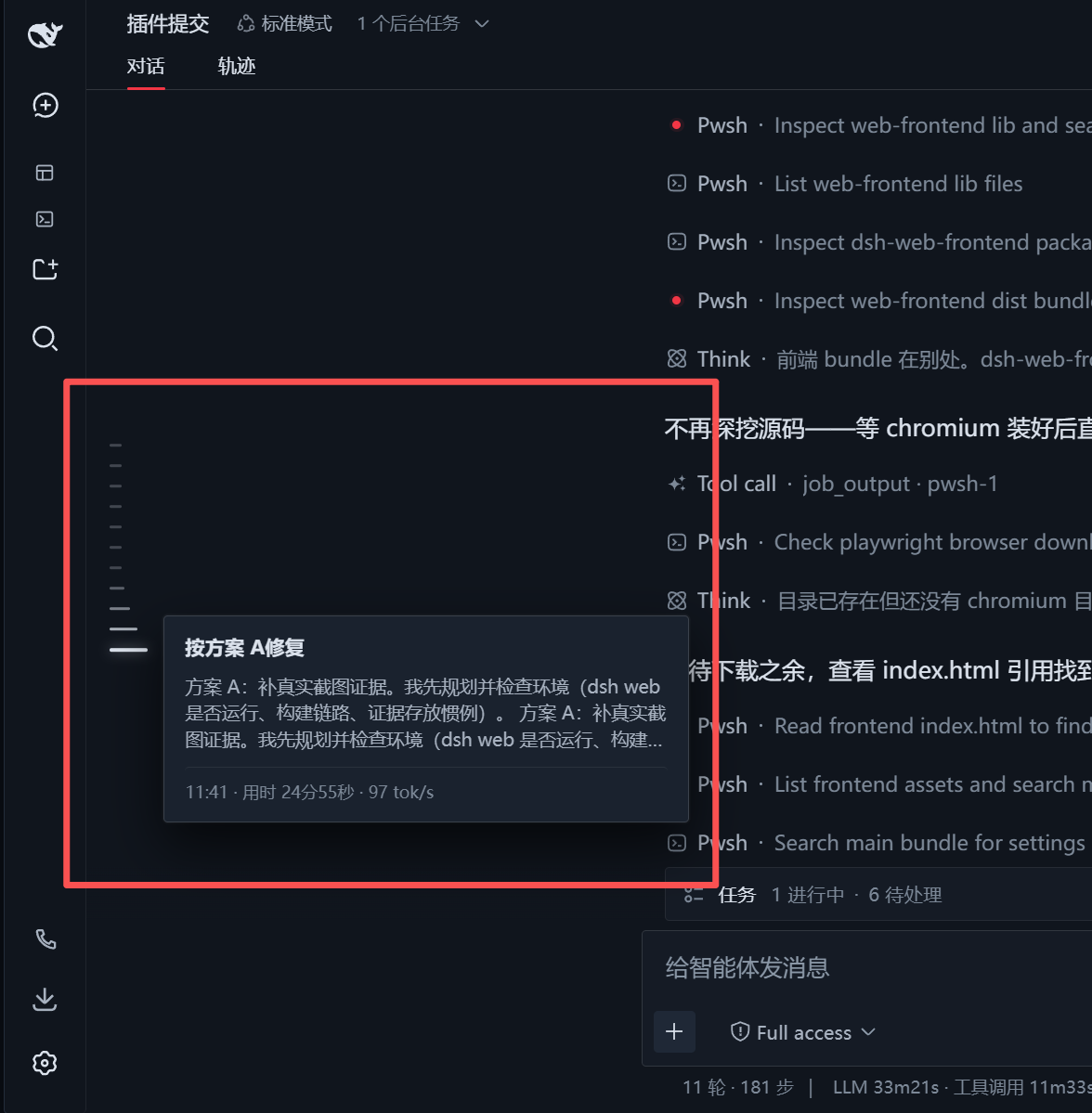
🌟 核心特性
- 左侧固定垂直居中时间线点阵(Timeline Rail):
- 紧贴工作区/侧边栏右分界线,固定在视口垂直居中位置,不随消息滚动位移;
- 严格按右侧真实用户提问生成横向刻度点(排除产物、工具执行与系统占位节点);
- 支持对话轮次过多时的自适应最大高度限制(
max-height)与鼠标滚轮平滑滚动。
- 经典鱼眼波浪放大动效(Fish-eye Magnification):
- 鼠标滑过时呈现丝滑的阶梯波浪扩散放大(26px / 19px / 14px / 10px / 8px)。
- 极简毛玻璃悬浮概览卡片(Hover Overview Card):
- 第一行:用户提问纯文本(无冗余时间标签);
- 第二行:模型最终回复与说明正文(严格过滤 Think 思考过程、Bash 工具执行与文件产物);
- 底部元数据:发送时间 · 用时 · Token/吞吐率单行展示;
- 点击精准直达:点击任意刻度点或悬浮卡片,平滑滚动至对应对话轮次。
- 顶部自动拉取(Auto Load Older):
- 鼠标悬停在顶部刻度或向上滚轮触顶时,自动触发「加载更早」历史会话,动态向上延长刻度点阵。
📦 如何安装与配置到 DSH
DSH 采用 Cordis 模块化微内核架构,你可以通过以下方式安装该插件:
环境要求
- DSH
>=0.1.2-alpha.2 - Web Profile
- 支持客户端注入的 DSH Web UI
方法一:通过 NPM 线上源安装(推荐)
1. 使用 DSH 官方 CLI 命令一键安装
bashdsh plugin --profile web add -w dsh-history-tree
当前本地兼容版本为 1.0.4。如需固定版本,可执行:
bashdsh plugin --profile web add -w "dsh-history-tree@1.0.4"
2. 或者在 Web Profile 目录下通过 npm/pnpm 安装
bash# 已设置 DSH_HOME 时
cd "$DSH_HOME/profiles/web"
# 未设置 DSH_HOME 时
cd ~/.dsh/profiles/web
npm i dsh-history-tree
# 或使用 pnpm
pnpm add -w dsh-history-tree
安装完成后,请确认 $DSH_HOME/profiles/web/package.json(未设置 DSH_HOME 时为 ~/.dsh/profiles/web/package.json)中的 dsh.profile.bundles 数组已包含 dsh-history-tree:
json1{
2  "name": "dsh-profile-web",
3  "private": true,
4  "dependencies": {
5    "dsh-history-tree": "^1.0.4"
6  },
7  "dsh": {
8    "profile": {
9      "bundles": [
10        "@deepseek-ai/dsh-base",
11        "@deepseek-ai/dsh-web-app",
12        "dsh-history-tree"
13      ]
14    }
15  }
16}
方法二:通过本地源码目录(Link 方式)安装
如果你在本地开发该插件,可以使用本地链接方式安装:
bash# 将本地插件目录以 link 方式添加至 web profile 的依赖中
dsh plugin --profile web add -w "link:/path/to/dsh/plugin/dsh-history-tree"
注意:如果执行
add后启动报错提示子包重复声明,请检查$DSH_HOME/profiles/web/package.json(未设置DSH_HOME时为~/.dsh/profiles/web/package.json)中的dsh.profile.bundles数组,确保其中仅包含根包(如dsh-history-tree、@linxin666/dsh-web-ui-all等),避免包含子组件包。
🚀 启动与体验
启动 DSH Web 服务:
bashdsh --profile web
# 或者
dsh web
打开浏览器访问 http://127.0.0.1:3080/,打开任意包含多轮问答的对话,即可在左侧看到垂直居中的时间线点阵。
📂 项目结构
dsh-history-tree/
├── cordis.patch.yml   # Cordis 插件 Profile 声明补丁
├── package.json       # 模块清单与 client 端 inject 依赖
├── README.md          # 中文说明文档
├── README.en.md       # English documentation
├── docs/
│   └── images/        # 说明文档截图与预览图
└── lib/
    ├── index.js       # Host 端(服务端)入口
    └── client.js      # Client 端(前端鱼眼动效、DOM提取、卡片渲染逻辑)