dsh-client-ui-obsidian-memoryDeepSeek Harness plugin
deepseek harness plugin obsidian memory
- Stars
- 14
- Forks
- 0
- License
- MIT
- Last commit
- Aug 17, 2026
Overview
deepseek harness plugin obsidian memory
Original README
Cached from the project repository on Sep 3, 2026. This is source content, separate from the Agents.md review above.
dsh-client-ui-obsidian-memory
🧠 Obsidian Memory for DeepSeek Harness — persistent memory via local Markdown vault
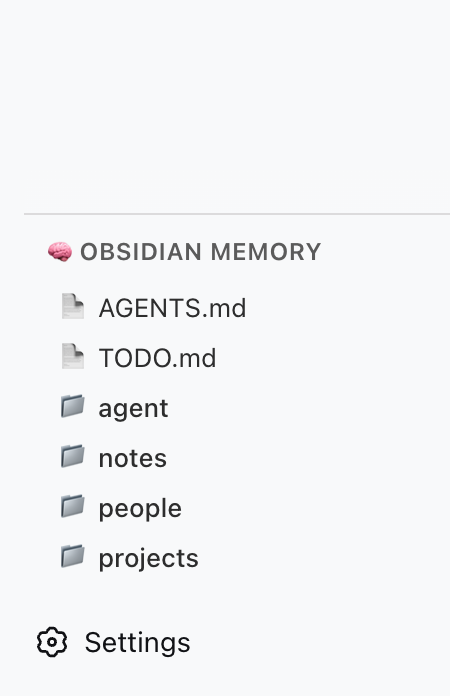
A DSH plugin that gives your AI agent persistent memory backed by a local Obsidian (or plain Markdown) vault. It registers 5 file-system tools (obsidian_memory_*) and renders a sidebar panel showing vault status and tool reference.
Inspired by @Saccc_c's Codex memory techniques.
What it does
- 5 memory tools — AI can read, list, search, write, and append to your local vault
- Sidebar panel — renders inside the
sidebar.obsidian-memoryslot in DSH's left column - No external server — talks directly to the file system via DSH's host runtime
- Codex-compatible — works with the
Codex/directory structure recommended by the community
Available Tools
| Tool | Action |
|---|---|
obsidian_memory_read | Read a Markdown or text file |
obsidian_memory_list | List files and directories |
obsidian_memory_search | Full-text search across .md and .txt files |
obsidian_memory_write | Write or overwrite a file |
obsidian_memory_append | Append content to the end of a file |
Quick Start
1. Prepare your vault
Create a Codex/ folder anywhere on your machine (e.g. inside an Obsidian vault):
~/Documents/Obsidian Vault/
└── Codex/
    ├── AGENTS.md      ← AI operating instructions
    ├── TODO.md        ← pending tasks / open loops
    ├── people/
    ├── projects/
    ├── notes/
    └── daily/
2. Install the plugin
One command, from anywhere:
bashdsh plugin add dsh-client-ui-obsidian-memory        # npm release (recommended)
# or install straight from source:
dsh plugin add detongz/dsh-client-ui-obsidian-memory
The plugin ships a
dsh.bundlemanifest, sodsh plugin addboth installs the package and activates it as a profile layer (the bundledcordis.patch.ymlinserts theui-obsidian-memoryentry). No manualcordis.patch.ymledit is needed to load the plugin.
3. Configure your vault path
Point the plugin at your Codex/ folder. In your profile's cordis.patch.yml:
yaml- id: ui-obsidian-memory
  config:
    vaultPath: /Users/YOURNAME/Documents/Obsidian Vault/Codex
Replace vaultPath with the absolute path to your Codex/ folder.
Alternatively set the environment variable OBSIDIAN_VAULT_PATH.
4. Restart DSH
bashdsh web # or however you launch DSH
After restart:
- The sidebar panel appears in the left column (🧠 Obsidian Memory)
- The 5 tools are available to the AI when
vaultPathis configured
Configuration
| Option | Type | Default | Description |
|---|---|---|---|
vaultPath | string | — | Absolute path to your Codex/ vault directory |
Environment variable fallback (optional):
bashexport OBSIDIAN_VAULT_PATH=/Users/YOURNAME/Documents/Obsidian Vault/Codex
If neither vaultPath in config nor the env var is set, the plugin logs a warning and skips tool registration.
Architecture
┌─────────────────────────────────────────┐
│ DSH Web (browser)                       │
│  ┌─────────────────────────────────┐    │
│  │ sidebar.obsidian-memory          │    │
│  │  ┌─────────────────────────┐    │    │
│  │  │ 🧠 Obsidian Memory      │    │    │
│  │  │  — tool reference       │    │    │
│  │  │  — vault structure      │    │    │
│  │  └─────────────────────────┘    │    │
│  └─────────────────────────────────┘    │
└─────────────────────────────────────────┘
                    │
┌───────────────────▼─────────────────────┐
│ DSH Host (Node.js)                      │
│  • reads / writes local files           │
│  • registers 5 obsidian_memory_* tools  │
└─────────────────────────────────────────┘
                    │
┌───────────────────▼─────────────────────┐
│ Local File System                       │
│  ~/Documents/Obsidian Vault/Codex/      │
└─────────────────────────────────────────┘
| Component | Role |
|---|---|
Host (lib/index.js) | Node side: registers tools, reads/writes vault files |
Client (lib/client.js) | Browser side: sidebar panel with static tool reference |
| Vault | Data source: local Markdown files |
Troubleshooting
| Symptom | Cause | Fix |
|---|---|---|
| Plugin not in Settings → Plugins | dsh plugin add installed an older version (pre-0.3.2) as a plain dependency | Reinstall: dsh plugin add dsh-client-ui-obsidian-memory@latest |
| Tools not available to AI | vaultPath not configured | Set vaultPath in cordis.patch.yml or env var |
| Sidebar panel not visible | DSH version lacks sidebar.obsidian-memory slot | Upgrade DSH to ≥ 0.1.0-rc.5 (or a build that declares the slot) |
| "Path traversal detected" error | AI tried to access files outside vault | All paths are sandboxed to vaultPath |
Development
bashgit clone https://github.com/detongz/dsh-client-ui-obsidian-memory.git
cd dsh-client-ui-obsidian-memory
npm install
npm run build        # outputs lib/index.js + lib/client.js
npm run watch        # dev mode with auto-rebuild
Build artifacts:
lib/index.js— host entry (tool registration + file I/O)lib/client.js— browser bundle (DSH closure-factory format, CSS inlined)
License
MIT