dsh-chatgpt-bridgeDeepSeek Harness plugin
MCP bridge that lets ChatGPT web create, view, continue, and control DeepSeek Harness (DSH) agent sessions.
- Stars
- 15
- Forks
- 0
- License
- MIT
- Last commit
- Aug 29, 2026
- Latest release
- v0.5.1
Overview
MCP bridge that lets ChatGPT web create, view, continue, and control DeepSeek Harness (DSH) agent sessions.
Original README
Cached from the project repository on Sep 3, 2026. This is source content, separate from the Agents.md review above.
dsh-chatgpt-bridge
Let ChatGPT drive your local DSH agents.
在 ChatGPT 里创建任务、继续会话、监督 Goal、处理审批并检查结果,不用在 ChatGPT 和 DSH 之间反复复制 Prompt。
dsh-chatgpt-bridge connects ChatGPT Web → secure MCP tunnel → DeepSeek Harness (DSH). ChatGPT becomes the control surface; DSH keeps the agent loop, tools, skills, subagents, workflows, sandbox, approvals and workspace security model.
The bridge connects the two sides. It does not replace DSH, modify DSH core, or route DSH model traffic through ChatGPT.
Current package: v0.5.1, targeting DeepSeek Harness 0.1.1-rc.2. After a successful connection, ChatGPT should see tool count = 23.
Why this exists
A normal ChatGPT + local-agent workflow has too much manual glue:
1Think in ChatGPT
2      ↓
3copy prompt to DSH
4      ↓
5wait / inspect logs
6      ↓
7copy result back
8      ↓
9review in ChatGPT
10      ↓
11repeat
With the bridge:
ChatGPT Web
   ↓  create / continue / supervise / approve
Secure MCP tunnel
   ↓
dsh-chatgpt-bridge
   ↓
DeepSeek Harness
   ↓
local workspace + tools + agent runtime
You stay in ChatGPT while DSH remains the execution engine.
What you can do from ChatGPT
- create and inspect native DSH sessions;
- send follow-up instructions without copying context between apps;
- start, inspect, update and wait on Goals;
- approve DSH actions through the bridge when your DSH policy requires it;
- list registered workspaces and inspect runtime health;
- keep using DSH's own sandbox, approval and workspace boundaries;
- manage the supported tunnel runtime from the DSH Web settings UI.
Real setup
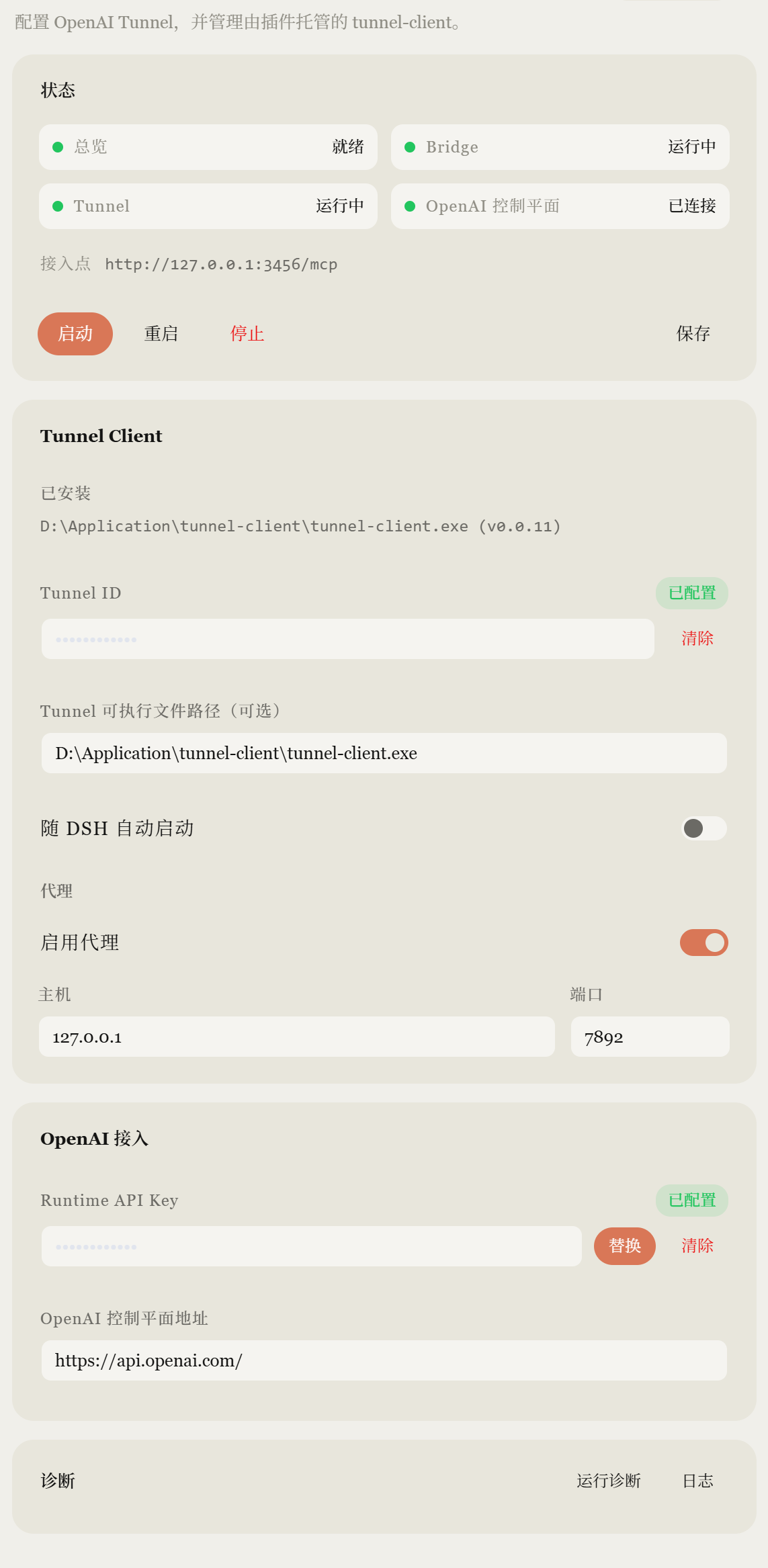
The screenshot is from a real DSH Web installation with sensitive values masked.
Quick start
Requirements
- Node.js 22+
- a working DeepSeek Harness installation (
dshonPATH) - a DSH Web profile/runtime
- ChatGPT access that can use the currently supported MCP/custom-app connection flow
1. Install the plugin
bashdsh plugin --profile web add dsh-chatgpt-bridge
npm install dsh-chatgpt-bridge alone is not enough: the plugin must be added to a DSH profile bundle.
2. Start DSH Web
bashdsh web
Keep DSH Web and the bridge in the same web profile/runtime so ChatGPT-created sessions appear live in the UI.
Default local endpoints:
| Service | Endpoint |
|---|---|
| DSH Web | http://127.0.0.1:3080 |
| Bridge MCP | http://127.0.0.1:3456/mcp |
3. Read the bridge token
Windows PowerShell:
powershellGet-Content "$HOME\.dsh\chatgpt-bridge.token"
macOS / Linux:
bashcat ~/.dsh/chatgpt-bridge.token
Treat this token like a password. Do not commit it, post it, or paste it into public chats.
Alternatively, set DSH_CHATGPT_BRIDGE_TOKEN yourself and the bridge uses it instead of generating a file.
4. Connect ChatGPT
ChatGPT Web cannot reach a plain localhost MCP endpoint directly. Use the secure MCP/tunnel connection mechanism currently supported by OpenAI and forward it to:
http://127.0.0.1:3456/mcp
Use the bridge token as the MCP bearer credential where the connection flow requires it.
The bridge keeps a localhost-first design: it binds 127.0.0.1, never exposes a public interface, and never self-hosts a tunnel.
5. Refresh tools and verify
After connecting, refresh/rescan the MCP tools in ChatGPT and run a read-only check:
请使用已连接的 DSH App,只做只读检查:
1. 调用 dsh_health
2. 调用 dsh_list_workspaces
3. 不修改任何文件
4. 返回 bridge version、health 和 workspace 名称
A healthy first check should look like:
bridge version = 0.5.1
tool count = 23
If health is OK, the version matches, and your registered workspace appears, the control path is ready.
First useful workflow
A practical pattern is:
ChatGPT: define the task and constraints
        ↓
Bridge: create / start a DSH Goal
        ↓
DSH: execute inside its registered workspace
        ↓
Bridge: wait, inspect status, surface approvals
        ↓
ChatGPT: review the result and decide what happens next
For a safe first run, start with a read-only Goal:
使用 DSH App 创建一个只读检查目标:
- workspace 使用 dsh_list_workspaces 查到的已注册工作区
- goal:只读检查项目
- constraints:read_only=true
- 列出项目结构并总结 README
- 等待目标结束后只汇报结果,不修改任何文件
Security model
This is a control bridge, not a remote shell replacement.
- The MCP server binds to loopback by default.
- It binds
127.0.0.1, never exposes a public interface, and never self-hosts a tunnel. - DSH remains responsible for its own sandbox, approvals and workspace rules.
- The bridge only works with workspaces already registered in DSH.
- Tokens and tunnel/runtime secrets are stored outside the repository and should never be committed.
- Write/action tools are real actions. Keep approval policies appropriate for the workspace you expose.
- Tunnel/runtime management is designed to fail closed around process ownership and lifecycle ambiguity.
If you only need inspection, use read-only prompts and keep DSH constraints read-only.
What this project is not
- It is not a ChatGPT API proxy.
- It does not make DSH use your ChatGPT subscription as a model provider.
- It does not upload an arbitrary workspace to ChatGPT.
- It does not bypass DSH approvals or sandboxing.
- It does not modify DeepSeek Harness core.
Troubleshooting
ChatGPT cannot connect
127.0.0.1 only exists on your machine. Confirm that your supported secure tunnel/MCP connection forwards to the bridge endpoint and that the bridge token matches the running DSH profile.
401 Unauthorized
Re-read the token from the active DSH home/profile and make sure the connector sends the matching bearer credential.
No workspace appears
The bridge only lists registered DSH workspaces. Register the project in DSH first; the bridge intentionally does not auto-register arbitrary filesystem paths.
Session exists but is not live in DSH Web
Run the bridge and DSH Web in the same web profile/runtime. Separate runtimes may persist sessions but will not provide the same live UI behavior.
Tool list looks stale
Restart/upgrade the plugin as needed, then refresh/rescan the MCP tools on the ChatGPT side.
Project status
This is an actively maintained, independent DSH plugin. Compatibility releases track DeepSeek Harness changes while preserving the bridge's MCP/tool semantics and security boundaries.
Current package:
dsh-chatgpt-bridge@0.5.1
Compatibility: v0.5.1 → DSH 0.1.1-rc.2. Fresh real ChatGPT UI validation after each DSH upgrade still needs to be rechecked on your machine.
Distribution and ecosystem listings:
Third-party directory labels describe those directories' own checks; they are not security audits or endorsements.
Development
The bridge is a standalone DSH plugin with no DSH core modifications. Development focuses on:
- MCP tool/schema compatibility;
- Goal/session lifecycle reliability;
- native settings and tunnel runtime management;
- process-ownership safety;
- regression and compatibility testing across supported DSH releases.
License
MIT. See LICENSE.
Unofficial community project. Not affiliated with or endorsed by OpenAI or DeepSeek.