claude-paperDeepSeek Harness plugin
📖 Cross-agent research paper toolkit for Claude Code, Codex, OpenCode, and DeepSeek Harness—quick summaries, deep study materials, code demos, and a local web viewer.
- Stars
- 334
- Forks
- 26
- License
- MIT
- Last commit
- Aug 14, 2026
Overview
📖 Cross-agent research paper toolkit for Claude Code, Codex, OpenCode, and DeepSeek Harness—quick summaries, deep study materials, code demos, and a local web viewer.
Original README
Cached from the project repository on Sep 3, 2026. This is source content, separate from the Agents.md review above.
Claude Paper
Transform research papers into comprehensive learning environments



A research-paper learning plugin for Claude Code, Codex, OpenCode, and DeepSeek Harness. It preserves the same study workflow, generated materials, code demonstrations, and interactive web viewer across supported agents.
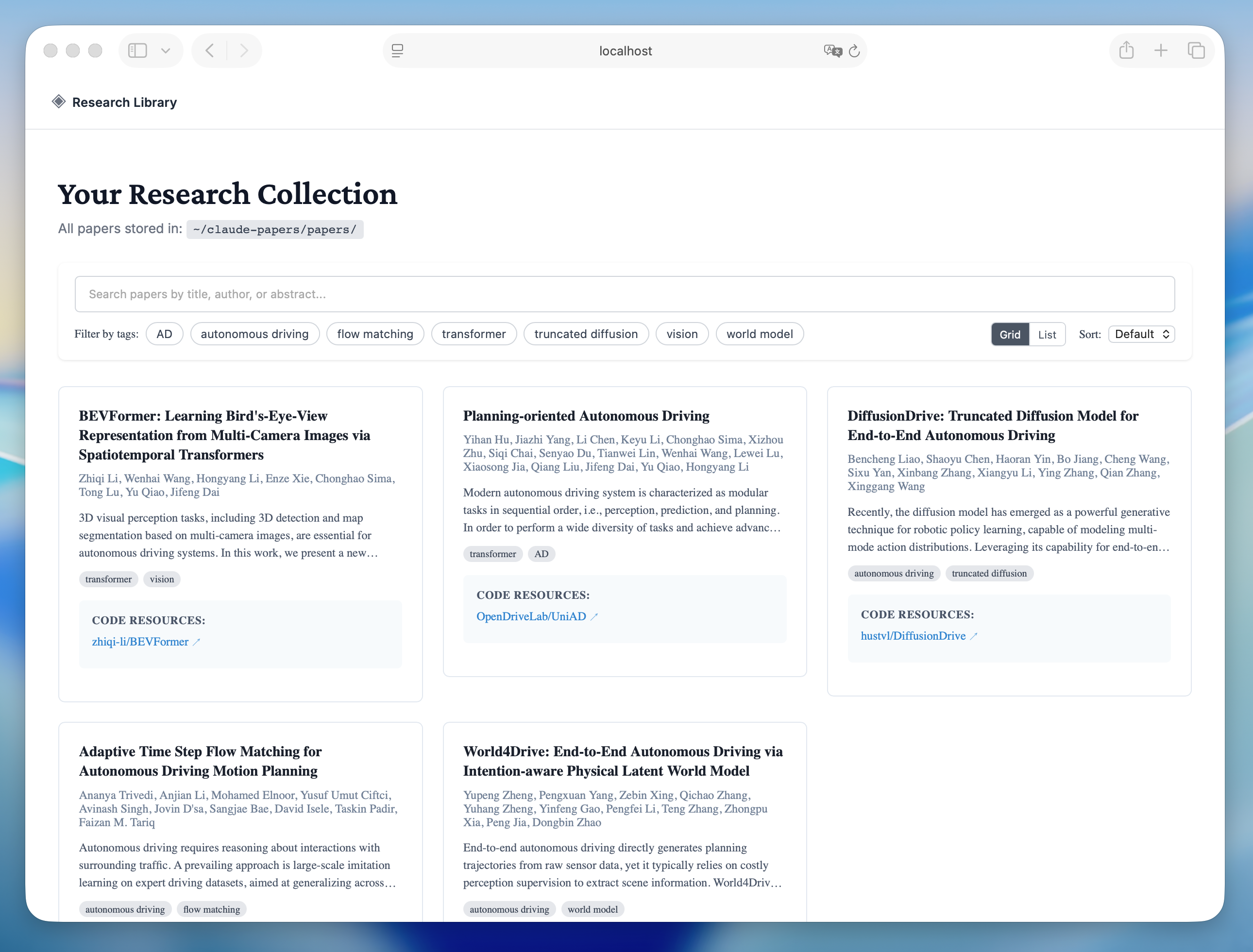
Library View - Browse and search your paper collection |
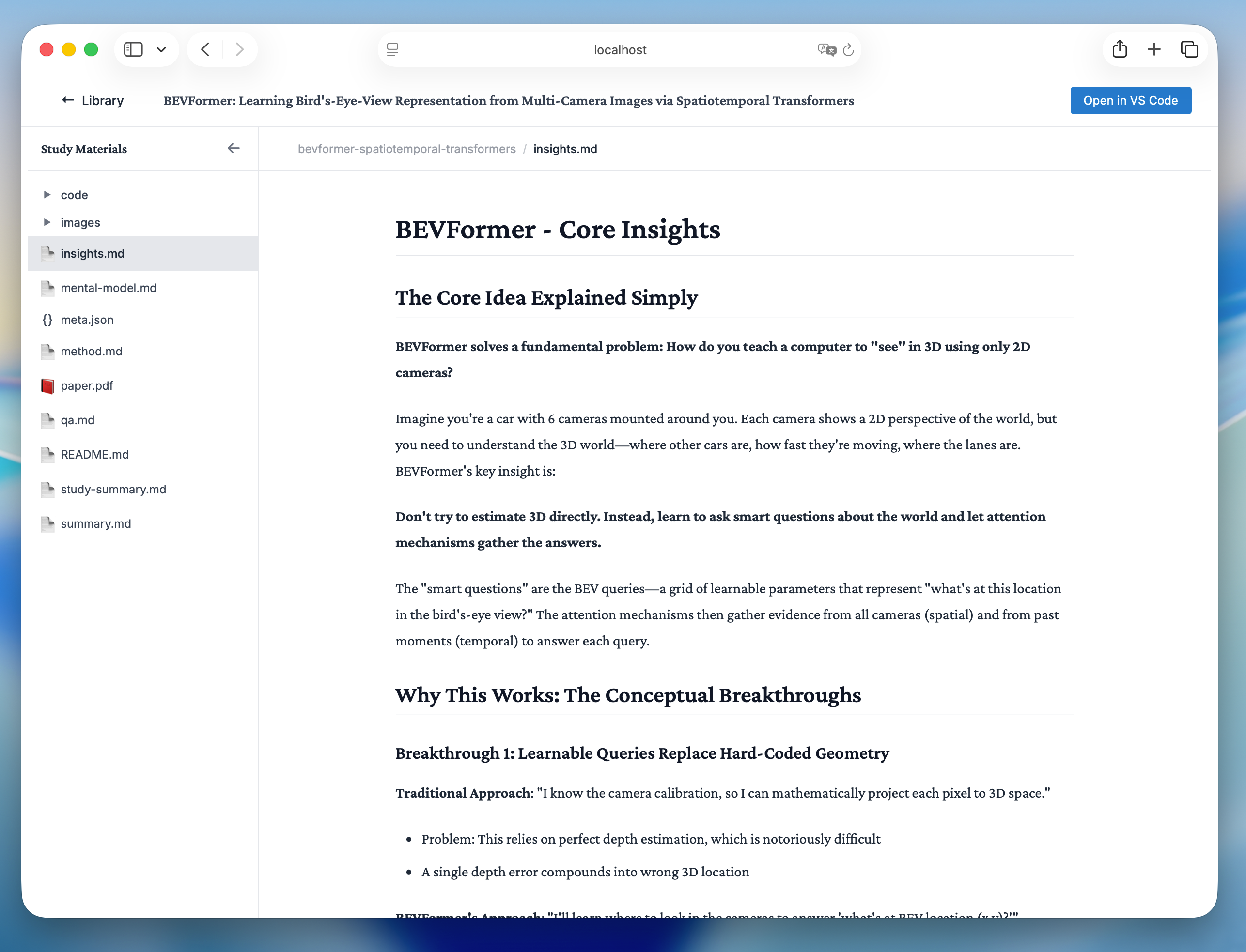
Reading View - Study papers with rich formatting and math support |
Features
- Automatic PDF parsing - Extract title, authors, abstract, links, and complete paper text
- Context-safe previews - Save complete text to
paper.txtwhile keeping a 50k preview in metadata - Code repository detection - Automatically finds GitHub, arXiv, CodeOcean links
- Quick paper summaries - Screen a paper with a concise 300–500 word overview before a deep study
- Adaptive learning materials - Generates README, summary, insights, Q&A based on paper complexity
- Code demonstrations - Clean implementations with Jupyter notebooks and original code integration
- Interactive web viewer - Nuxt.js interface with math equation support (KaTeX)
- Intelligent assessment - Difficulty levels and paper type detection for adaptive content generation
Quick Start
Install all supported agents
Install Claude Code, Codex, OpenCode, and DeepSeek Harness with one command—no repository clone required:
bashnpx --yes @zlzliqing/claude-paper@latest install
The default all target covers all four agents. For Claude Code, the installer uses the official Claude CLI to register the package-local marketplace and install or update the user-scoped plugin. For the other agents, it installs the shared Skills and OpenCode commands where applicable.
Install only selected agents when needed:
bashnpx --yes @zlzliqing/claude-paper@latest install --target claude-code
npx --yes @zlzliqing/claude-paper@latest install --target codex
npx --yes @zlzliqing/claude-paper@latest install --target opencode
npx --yes @zlzliqing/claude-paper@latest install --target deepseek-harness
Upgrade an existing installation with the same formal distribution channel:
bash# Upgrade all supported agents
npx --yes @zlzliqing/claude-paper@latest upgrade

# Keep upgrading only the agents selected during installation
npx --yes @zlzliqing/claude-paper@latest upgrade --target codex,opencode
The default upgrade target is all. If the existing installation only targets selected agents, pass the same --target list during upgrade so no additional agent integrations are added.
The npm package copies its packaged plugin runtime to the user data directory, installs the generated compatibility Skills in ~/.agents/skills/ when a shared-Skills host is selected, and adds OpenCode commands when OpenCode is selected. It initializes ~/claude-papers/ only when the library does not already exist. Restart the selected agents after installation or upgrade.
Claude Code Marketplace-only alternative
If you only use Claude Code, you can still install directly from its marketplace:
bash/plugin marketplace add alaliqing/claude-paper
/plugin install claude-paper
Claude Paper currently runs through Agent Skills; no separate MCP server installation or configuration is required.
System Requirements
- Node.js: 20.19.x, or 22.12.0 and higher
- npm: Comes with Node.js
- Agent host: Claude Code, Codex, OpenCode, or DeepSeek Harness
- Claude Code CLI: Required when
allorclaude-codeis selected - poppler-utils: For PDF image extraction (install via system package manager)
- macOS:
brew install poppler - Ubuntu/Debian:
sudo apt-get install poppler-utils - Arch Linux:
sudo pacman -S poppler
- macOS:
Usage
Quickly Summarize a Research Paper
Ask the selected agent for a quick summary, or use the host command directly:
bash# Claude Code
/claude-paper:summary /path/to/paper.pdf

# OpenCode
/claude-paper-summary /path/to/paper.pdf
In Codex or DeepSeek Harness, ask for a quick paper summary or explicitly load the claude-paper-summary Skill. This creates quick-summary.md while preserving the PDF, complete paper.txt, and metadata in the shared paper library.
Study a Research Paper
Simply ask the selected agent to study a paper:
Help me study the paper at ~/Downloads/attention-is-all-you-need.pdf
You can also use URLs:
# Direct PDF URL
Help me study the paper at https://arxiv.org/pdf/1706.03762.pdf

# arXiv abstract URL (automatically converted to PDF)
Help me study the paper at https://arxiv.org/abs/1706.03762
The agent will automatically trigger the study workflow and:
- Parse the PDF and extract metadata
- Analyze paper complexity and type
- Generate adaptive learning materials
- Create code demonstrations (if applicable)
- Extract and include original code (if available)
- Extract key figures and images
- Update the global search index
- Launch the web viewer automatically
Launch Web Viewer
bash# Claude Code
/claude-paper:webui

# OpenCode
/claude-paper-webui
In Codex or DeepSeek Harness, ask the agent to start the Claude Paper web viewer or explicitly load the claude-paper-webui Skill.
Opens the interactive web interface at http://localhost:5815 where you can:
- Browse all studied papers
- View generated materials with math rendering
- Access code demonstrations and notebooks
- Search through your paper library
Paper Storage Structure
Papers are organized in ~/claude-papers/papers/{paper-slug}/:
~/claude-papers/
├── papers/
│   └── {paper-slug}/
│       ├── paper.pdf                     # Original PDF file
│       ├── paper.txt                     # Complete extracted text
│       ├── meta.json                     # Paper metadata (title, authors, etc.)
│       ├── quick-summary.md               # Concise screening summary (quick workflow)
│       ├── README.md                     # Quick navigation and overview
│       ├── summary.md                    # Detailed summary
│       ├── insights.md                   # Key insights (most important!)
│       ├── method.md                     # Methodology (if complex)
│       ├── mental-model.md              # Paper categorization (if needed)
│       ├── reflection.md                # Future directions (if needed)
│       ├── qa.md                         # Learning questions
│       ├── index.html                    # Interactive HTML explorer
│       ├── images/                       # Extracted figures and tables
│       │   ├── fig1.png
│       │   └── fig2.png
│       └── code/                         # Code demonstrations
│           ├── core-demo.py              # Clean reference implementation
│           └── concept-demo.ipynb        # Interactive Jupyter notebook
│
└── index.json                           # Global search index
Architecture
Plugin Structure
claude-paper/
├── package.json                       # npm distribution manifest
├── bin/
│   └── claude-paper.mjs              # npx install and upgrade entry point
├── .claude-plugin/
│   └── marketplace.json              # Claude Code marketplace catalog
├── .codex-plugin/
│   └── plugin.json                   # Codex plugin manifest
├── .agents/skills/                   # OpenCode and DSH discovery entries
├── .opencode/commands/               # OpenCode slash-command wrappers
├── skills/                           # Codex packaged Skill adapters
├── scripts/
│   ├── sync-agent-adapters.mjs       # Deterministic adapter generator
│   └── install-agent-adapters.mjs    # Cross-agent installer and upgrader
├── plugin/
│   ├── .claude-plugin/
│   │   └── plugin.json              # Plugin manifest
│   ├── skills/
│   │   ├── study/
│   │   │   ├── SKILL.md             # Study workflow definition
│   │   │   └── scripts/
│   │   │       ├── parse-pdf.js    # PDF parsing utility
│   │   │       └── extract-images.py  # Image extraction
│   │   ├── summary/
│   │   │   └── SKILL.md             # Quick summary workflow definition
│   │   └── webui/
│   │       └── SKILL.md             # Web viewer workflow definition
│   ├── commands/
│   │   └── webui.md                # /webui command
│   ├── hooks/
│   │   ├── hooks.json              # Session lifecycle hooks
│   │   └── check-install.sh        # Installation verification
│   ├── src/
│   │   └── web/                    # Nuxt.js web viewer
│   │       ├── components/         # Vue components
│   │       ├── composables/        # Vue composables
│   │       ├── server/             # API endpoints
│   │       └── package.json
│   └── package.json
└── README.md
Key Components
- Study Skill - Main workflow agent that orchestrates deep paper processing
- Summary Skill - Concise paper-screening workflow
- PDF Parser - Extracts text, metadata, and code links using pdf-parse
- Image Extractor - Python script for PDF figure extraction
- Web Viewer - Nuxt.js application with Nitro API server
- Hooks System - Claude Code lifecycle setup
- Agent Adapters - Generated discovery and invocation wrappers for Codex, OpenCode, and DeepSeek Harness
Development
Running Tests
bash1# Verify cross-agent adapters and reviewed canonical Claude Skills
2npm test
3
4# Verify generated adapters are synchronized
5npm run check:adapters
6
7# Test PDF parsing
8node plugin/skills/study/scripts/parse-pdf.js /path/to/paper.pdf
9
10# Test web viewer
11cd plugin/src/web
12npm run dev
13
14# Test full workflow
15cd /path/to/claude-paper
16claude --plugin-dir ./plugin
17/claude-paper:study /path/to/paper.pdf
Verifying the npm Distribution
bash# Runs adapter checks and tests before producing the publishable tarball
npm pack --dry-run
Building for Production
bash# Build web viewer
cd plugin/src/web
npm run build

# The built viewer will be in .output/
Configuration
Environment Variables
No configuration required! The plugin uses sensible defaults:
- Papers directory:
~/claude-papers/ - Web viewer port:
5815 - Metadata preview limit:
50,000characters; complete extracted text remains inpaper.txt
Advanced Customization
You can modify behavior by editing the skill file at:
plugin/skills/study/SKILL.md
Contributing
Contributions are welcome! Please:
- Fork the repository
- Create a feature branch (
git checkout -b feature/amazing-feature) - Make your changes
- Add tests if applicable
- Commit your changes (
git commit -m 'add amazing feature') - Push to the branch (
git push origin feature/amazing-feature) - Open a Pull Request
License
This project is licensed under the MIT License - see the LICENSE file for details.
Acknowledgments
- Built with Claude Code
- PDF parsing powered by pdf-parse
- Web viewer built with Nuxt.js
- Math rendering by KaTeX